- id_2024254
- Version: 2.0
- Date: Feb 14, 2020 4:04:45 PM
Enabling remote logging of the audit messages
Enable remote logging of the audit messages.
Procedure
- Start the EAT config utility using the firefox localhost:9877/eatAdmin/EATConfig.html command.
- Assign a source ID for the scanner on the Audit Message Settings tab.
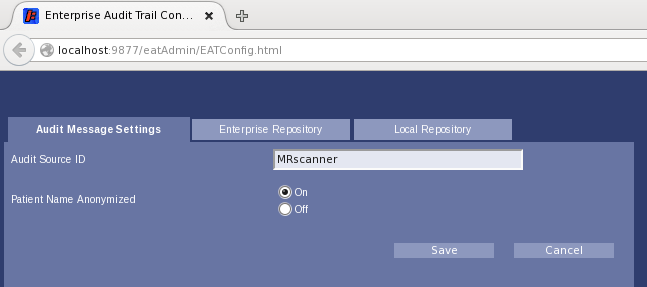
- Click Save.
- Click Enterprise Repository to switch to that tab.
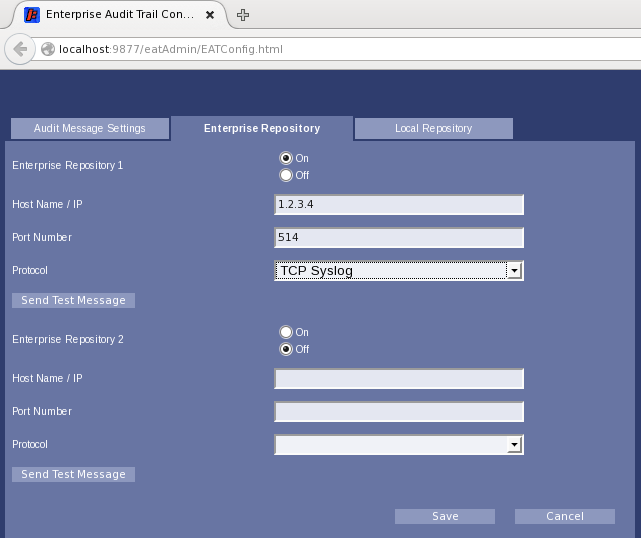
- Toggle the Enterprise Repository 1 radio button to On.
- Fill in the remote (collector) Host Name/IP. Contact site IT for IP address.
- Fill in the remote (collector) Port Number.
- If a port other than 514 is used for remote syslog, a corresponding modification to the firewall rule configuration is required. The firewall is configured by default to allow only certain outbound destination ports.
The file to modify is /usr/share/gehc_security/pnf/modality.sh. It contains instructions and standard iptables commands. Specific to syslog, modify the following lines in that file.
# Below for remote syslog
$IPTABLES -A OUTPUT -p udp -m udp --dport 514 -j ACCEPT
$IPTABLES -A OUTPUT -p tcp -m tcp --dport 514 -j ACCEPT
- Select the protocol for the remote (collector) (UDP or TCP).
- Click Save.