- id_13105875
- Version: 3.0
- Date: Aug 29, 2019 1:34:54 AM
About MR Scanner
Prerequisites
| Required persons | Preliminary requirements | Procedure | Finalization |
|---|---|---|---|
| 1 | Not Applicable | 5 minutes | Not Applicable |
| Condition | Reference | Effectivity |
|---|---|---|
|
Complete software setup before running the About MR Scanner tool. |
- | |
|
Verify the magnet rating plate serial number physically located on the scanner. |
- | - |
|
Verify magnet and system configurations in Guided Install before running About MR Scanner. |
- | - |
Disclaimer: Depending on the site’s service agreement, not all service tools, diagnostics, and utilities referenced in this document may be accessible. Contact a sales person for information on available service license packages.
The About MR Scanner function displays scanner information to the technologists, providing values for:
-
Magnet serial number
-
Magnet enclosure type
-
Field strength
-
Gradient type
This function also displays information related to safety manual details for gradient slew rate and peak spatial gradient strengths. About MR Scanner displays values recommended by International Electrotechnical Commission (IEC) standards. This procedure is to confirm that the scanner information from the About MR Scanner function is correct. The hardware configuration values determine what safety information to show that is related specifically to the site system. Safety data will not be displayed until this procedure has been completed. If any of the configurations are later modified, the safety data will no longer be displayed until this procedure is repeated. This feature does not impact functionality of any other subsystem.
View About MR Scanner
Procedure
- From the Common Service Desktop, select Tools > About
MR Scanner.
Figure 1. Example of About MR Scanner Confirmation Window
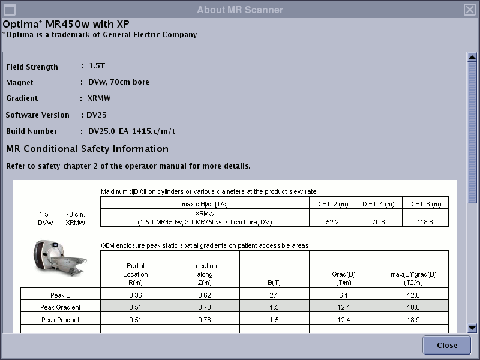
- Confirm that the scanner pictured and the information provided matches the site system.
- If the scanner pictured or other information does not match the site system, modify the configuration values from Guided Install. See View or Modify Basic Configuration with Guided Install.
View or Modify Basic Configuration with Guided Install
Procedure
- From the Common Service Desktop, select Guided Install.
- On the left sidebar, select Basic Configuration > Hardware Configuration.
- View and record the values for Field Strength, Gradient Type, Magnet Serial Number, and Magnet Enclosure.
- If any of these values are incorrect, modify the value by selecting
the correct value from the field’s drop-down menu. Click Configure.note:
For Magnet Enclosure, select Types to choose a magnet type from a picture menu.
- Exit Guided Install.
If any changes were made, reboot the system for the changes to take effect.
Run About MR Scanner from Command Line
If you are running the About MR Scanner tool from the command line, the first time you access the About MR Scanner information window, some fields may be missing content. To view the most current and accurate representation of scanner system information, run the About MR Scanner tool from the command line following the steps below.
Procedure
- Click C Shell to open a command prompt.
- Enter setupAbout and press Enter.
- A configuration message displays asking you to verify the magnet
rating plate.
- If the magnet rating plate serial number matches, type Yes and press Enter.
- If the magnet rating plate serial number does not match, type No and press Enter. Within the same window, a message displays directing you to use Guided Install to confirm hardware configuration before running this tool again (see View or Modify Basic Configuration with Guided Install).
Finalization
Finalization
If any changes were made to Guided Install during this procedure, perform SaveInfo.