- id_2002030
- Version: 2.1
- Date: Jul 4, 2019 9:02:44 PM
Quadrature Calibration Help
Use the quadrature calibration (or quad cal) tool to determine if the attenuation and phase values are correct.
This document is for reference only. See the service documentation for the latest information.
Tool purpose
The quadrature calibration (or quad cal) tool is designed to determine if the system has been set to the correct values for attenuation and phase. These values must be correct to achieve the required transmit map circularity. The quadrature calibration tool performs 17 30-second scans on the system’s transmit and receive chains. Values for each calibration display when the calibration is complete. Use the spherical phantom from the LV shim kit and the black universal phantom pad to perform these calibrations.
Setup requirements
- Spherical phantom (from LV shim kit)
- Universal phantom pad
- Begin with the head position when you perform both head and center calibrations. The quadrature calibration tool is designed to perform the head calibration before the center calibration. The quadrature calibration tool will prompt you to move the sphere to the center location when appropriate.
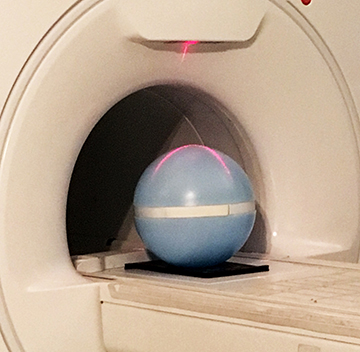
- Position the sphere so that the strap (in the groove) is horizontal, parallel to the table. The calibration will be fail if the sphere is positioned otherwise.
Figure 1. Phantom sphere position
- Run the quadrature calibration tool for every table-PA coil combination.
- Pre-requirement: N/A
- Post-requirement: N/A
Tool selections
- Calibrate
- This command runs a full set of tests and processing and updates the calibration files.
- Calibration status window
- This window indicates the function that the quadrature calibration tool is performing. The window shows calibration status information, including the coil ID number of the connected coil.
- Test
- This command runs a full set of tests and processing and does not update the calibration files.
- Verify
- This command uses the current amplitude and phase values to determine if the system is in quadrature.
- Calibrate Location(s)
- Choose head, center, or both. The quadrature calibration tool is designed to perform the head calibration first.
- Time Remaining
- This is a countdown of time remaining for the process that is currently showing in the status window.
Tool workflow
Follow instructions as provided by the quadrature calibration tool.
FAQ
N/A
Results interpretation and troubleshooting information
The quadrature calibration tool shows results in the pass/fail format. See the quadrature calibration tool section in the service documentation if the test fails.
Finalization
- Remove the service equipment and phantom.
- If you did quadrature calibration as a standalone procedure, do a check scan. If you did this procedure as part of a series of tests, continue with the test sequence.