- Topic ID: id_17479589
- Version: 1.0
- Date: Aug 28, 2018 3:54:53 PM
KFC (Fan Controller) Alarm Troubleshooting
Figure 1. FAN Control System Interconnection
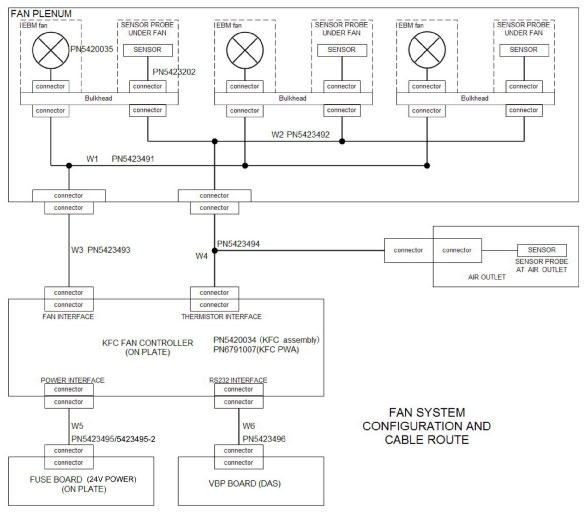
 |
|
1 KFC Intermit Communication with DCB
OC report (alarm info): KFC is not connected.
OC report (recover info): KFC is present and connected.
-
Remove the gantry right side cover, and turn off “Axial Enable”, “HVDC” and “120VAC” switches on the service switch panel.
-
Remove the gantry covers as required.
-
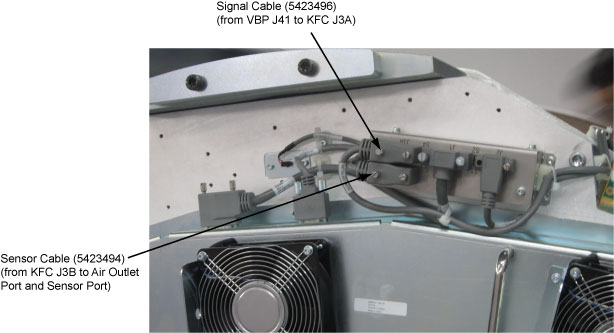
Verify the signal cable (5423496) is connected well.
If not, secure this cable.Figure 2. Verify Cable Connection
-
Turn on “Axial Enable”, “HVDC” and “120VAC” switches on the service switch panel.
-
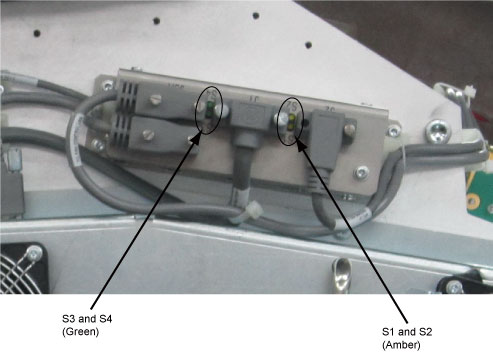
Verify that LEDs S1 (3.3V) and S2 (24V) of the fan controller board are lit.
Figure 3. KFC LEDs
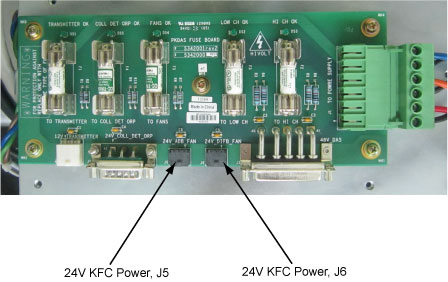
 If not, check the fuse board (5342000) output J5 and J6, voltage of Pin1 and Pin2 should be 24+/-0.12V.
Figure 4. Fuse Board
-
Verify that LED S3 of the fan controller board blinks. (See Figure 3)
If not, replace the fan controller board (6791007) or check functions and connections of the VBP board (5930200) and VDCB board (5395836).
2 KFC Sensor Open
OC report (alarm info): KFC has detected a thermistor open failure, Thermistor: #
OC report (recover info): KFC has recovered from a thermistor open failure. Thermistor: #
-
Remove the gantry right side cover, and turn off “Axial Enable”, “HVDC” and “120VAC” switches on the service switch panel.
-
Remove the gantry covers as required.
-
Remove the Vyper fan duck cover asm by referring to Vyper DAS Plenum Cooling Fans Replacement, 4.1 Cooling Fan Removal, steps from 5 to 8.
-
Verify the cables (5423492 and 5423202) are connected well.
Figure 5. Verify Cable Connections
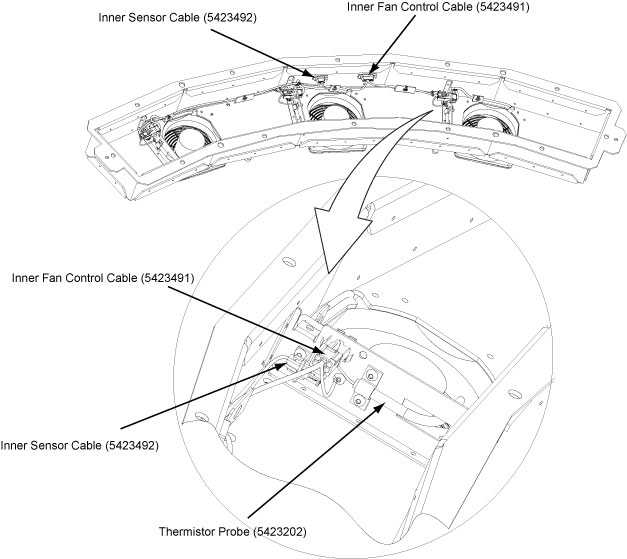
If not, secure these two cables.
-
Reinstall the Vyper fan duck cover asm by referring to reverse order of removal.
-
Verify the outer sensor cable (5423494) is connected well.
-
Turn on “Axial Enable”, “HVDC” and “120VAC” switches on the service switch panel, verify the problem is fixed.
If not, replace cables (5423494, 5423492, 5423202) as required.
3 KFC Sensor Shorts
OC report (alarm info): KFC has detected a thermistor short failure, Thermistor: #
OC report (recover info): KFC has recovered from a thermistor short failure. Thermistor: #
Refer to KFC Sensor Open.
4 KFC Fan Failure
OC report (alarm info): KFC has detected a fan failure, Fan: #
OC report (recover info): KFC has recovered from a fan failure. Fan: #
Please confirm KFC sensors are operating normally before fixing the fan failure.
-
Remove the gantry left side cover, and turn off “Axial Enable”, “HVDC” and “120VAC” switches on the service switch panel.
-
Remove the gantry covers as required.
-
Remove the Vyper fan duck cover asm by referring to Vyper DAS Plenum Cooling Fans Replacement, 4.1 Cooling Fan Removal, steps from 5 to 8.
-
Verify the inner fan control cable (5423491) and the fan (5420035) are connected well. (See Figure 5)
If not, secure them.
-
Reinstall the Vyper fan duck cover asm by referring to reverse order of removal.
-
Verify the outer fan control cable (5423493) is connected well.
-
Turn on “Axial Enable”, “HVDC” and “120VAC” switches on the service switch panel, verify the problem is fixed.
If not, replace cables (5423491, 5423493) or the fan (5420035, refer to Vyper DAS Plenum Cooling Fans Replacement) as required.
If not again, replace the KFC fan controller board (6791007) or the KFC fan controller assy (5420034).
5 Inlet and Outlet Over Temperature
OC report (alarm info): KFC has detected an inlet over temperature failure, Inlet: #
OC report (alarm info): KFC has detected an outlet over temperature failure
OC report (recover info): KFC has recovered from an inlet over temperature failure. Inlet: #
OC report (recover info): KFC has recovered from an outlet over temperature failure.
This is a alarm information to inform user about the ambient temperature information. When the over temperature information shows on the display screen, the detector performance may be influenced.