- Topic ID: id_11038851
- Version: 3.0
- Date: May 23, 2022 11:24:24 PM
Vyper DAS Plenum Cooling Fans Replacement
Prerequisites
This procedure defines the replacement process for DAS plenum cooling fans.
1 Cooling Fan Removal
Procedure
- Move the table cradle to the home position, and position the table to its lowest elevation.
- Remove gantry right side cover.
- notice
- Turn OFF Axial Enable, HVDC, and 120VAC switches on the service switch panel.
- Remove the rest of the gantry covers except the gantry rear cover.
- Position the DAS at 12 o’clock position.
- Lock the gantry in position using the rotational lock.
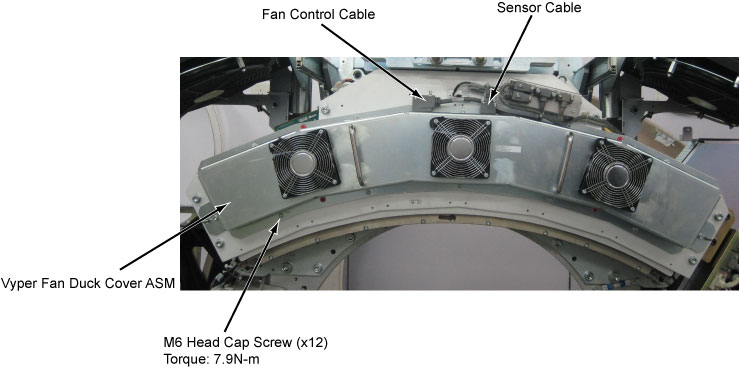
- Disconnect the fan control cable connector and the sensor cable connector from the Vyper fan duct cover assembly.
- Remove the Vyper fan duct cover assembly by unscrewing its M6x12
head cap screws by a
 on the Vyper Fan Duct Cover.
Figure 1. Remove the Vyper Fan Duct Cover Assembly
- Release the cable clamps holding the cooling fan cable to the Vyper fan duct cover assembly.
- Disconnect the cooling fan cable connector.
Figure 2. Cooling Fan Removal
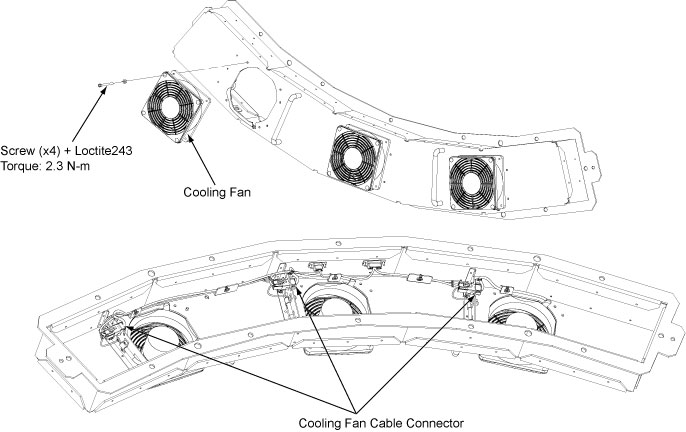
- Remove the cooling fan by unscrewing its four screws.
 |
2 Cooling Fan Installation
Procedure
- Get new cooling fan and secure it with the fan guards by four M4 screws. (Torque: 2.3N-m + Loctite243)
- Reconnect the cooling fan cable connector and fix the cable with the cable clamps to the Vyper fan duct cover assembly.
- Reinstall the Vyper fan duct cover assembly by screwing all M6 screws (Torque: 7.9N-m).
- Reconnect the fan control cable connector and the sensor cable connector to the Vyper fan duct cover assembly.
- Disengage the rotational lock.
- Turn on Axial Enable, HVDC, and 120VAC switches.
- Verify that the Vyper cooling fans are operating normally.
- Restore the gantry original configuration.