- Topic ID: id_23554314
- Version: 1.0
- Date: Oct 9, 2018 1:43:22 PM
PPC Board Battery Replacement
Prerequisites
Overview
1 Disassembly
Procedure
- If the battery is still working, save the JEDI runtime parameters. (See JEDI Generator Tools for instructions on performing this procedure.)
- Dismount the PPC board. Reference JEDI PPC Board Replacement (Pro 16).
- Use an electrostatic Discharge (ESD) protection bracelet and follow all ESD procedures.
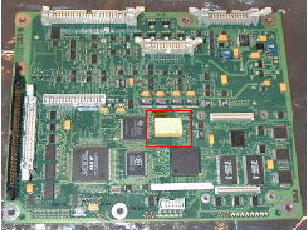
- Gently grasp the NV Ram battery on the PPC board (see Figure 1) between your thumb and forefinger. Pull it directly away from
its support on the board.
Figure 1. NV RAM Battery on PPC Board
 note:
note:This NV RAM contains a lithium carbon monoflouride (LiCFx) battery, used to provide the battery backup for the static ram and the time device. Return the former component to your local GEMS representative for recycling.
2 Reassembly
Procedure
- Install the new battery on the PPC board in the same location from which it was removed. Ensure that it is properly installed.
- notice
- Reinstall the PPC board in the inverter and reconnect all the cables.
 |
3 Finalization
Procedure
- Reapply the power.
- If the battery was working before the replacement, restore the JEDI runtime parameters that were saved prior to removing the PPC board battery (see JEDI Generator Tool). Otherwise, initialize the JEDI database (see JEDI Generator Tool) and run Filament Calibration.
- Start some exposures in different modes.
- Verify that the system works correctly.