- Topic ID: id_23554264
- Version: 1.0
- Date: Oct 9, 2018 1:41:17 PM
Heat Exchanger Replacement
Prerequisites
Overview
In order to replace the Heat Exchanger unit:
-
Lockout system
-
Remove HX pump
-
Replace heat exchanger
-
Re-install HX pump
-
Reconnect heat exchanger
1 Heat Exchanger (HX) Removal
Procedure
 warning
- Remove power to the gantry using proper Lockout / Tagout procedures.
- Remove gantry covers.
- Turn OFF all 3 switches (AXIAL DRIVE ENABLE , HVDC ENABLE, 120 VAC) on the Service Switch Panel.
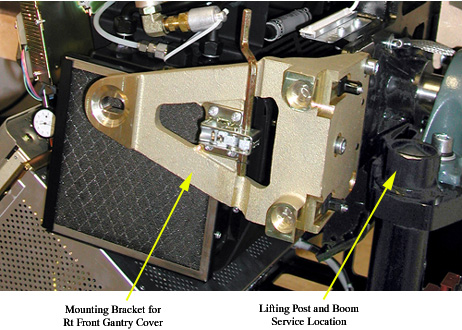
- Remove the right front gantry cover mounting bracket. See Figure 1.
Figure 1. Right Front Gantry Cover Mounting Bracket
- Remove the Power Interface board cover.
- Disconnect Power Interface board connectors J1, J2, and J7.
- Remove HX pump. Reference the Heat Exchanger Pump Replacement (Pro16) procedure for the process.
- Rotate the gantry so that the tube is at approximately the 3 o'clock
position, such that you can reach the lower mounting bolts for the heat exchanger.
See Figure 2.
Figure 2. Lower HX Mounting Bolt Locations
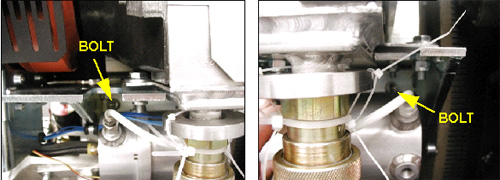
- Remove the two lower HX mounting bolts.
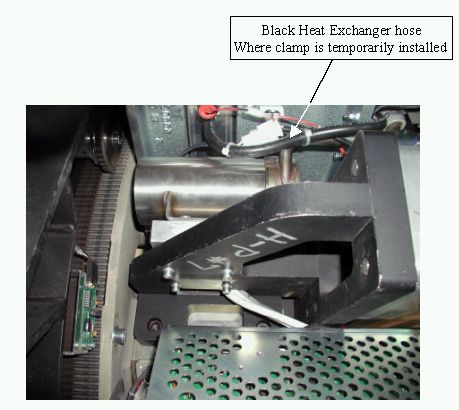
- If this system is a water-based cooled system, use the small metal clamp
(shipped with replacement part) to clamp off the black heat exchanger hose
(see Figure 3). This will prevent
air ingestion during the replacement process. The clamp should be installed
finger-tight.
Oil-cooled systems skip this step.
Figure 3. HX Hose for clamping (water-based systems)
- Disconnect the HX from the X-Ray tube's cooling hose at the quick disconnect on the HX.
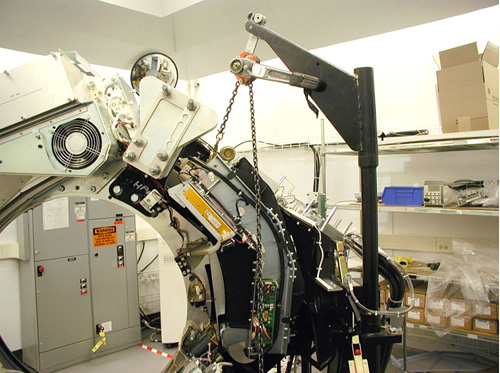
- Rotate the gantry so that the tube is between 4 and 5 o'clock, with
the heat exchanger lifting point at approximately 2 o'clock. See Figure 4.
Figure 4. Gantry Position
- Lock the gantry in position, using the rotational lock. Ensure that gantry rotation is locked by attempting to rotate the gantry by hand.
- warning
- Assemble the gantry post / boom / hoist and connect the hook to the lifting point on the HX. Be sure to remove the slack in the chain, as shown in Figure 4.
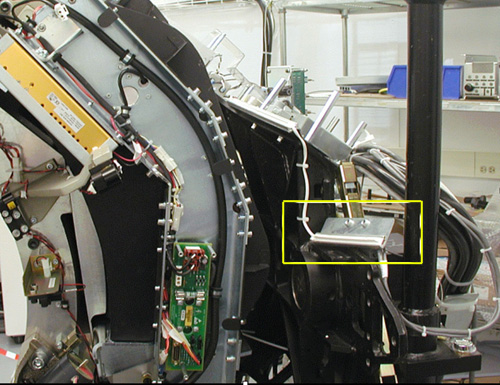
- Remove Gantry Contact Switch support bracket. See Figure 5.
Figure 5. Gantry Contact Switch Support Bracket
- warning
- Remove the two upper mounting bolts.
- notice
- notice
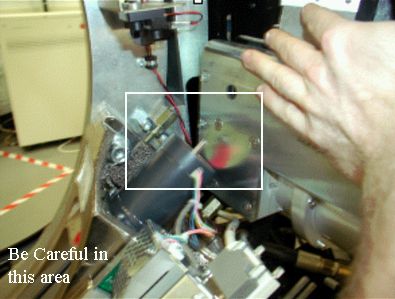
- Using the hoist to control the height of the HX, carefully swing the
HX free from the gantry.
Figure 6. Handling the Heat Exchanger
 |
 |
 |
 |
|
2 Heat Exchanger (HX) Installation
Procedure
- Using hoist, swing new HX into place on the gantry. Be careful in the collimator motor area where it is possible to cut wires and damage other equipment. See Figure 6.
- Start the upper HX mounting bolts by hand. Use the hoist to adjust height if necessary. You will also need to use some force to get the HX to align with the mounting holes on the gantry's rotating base.
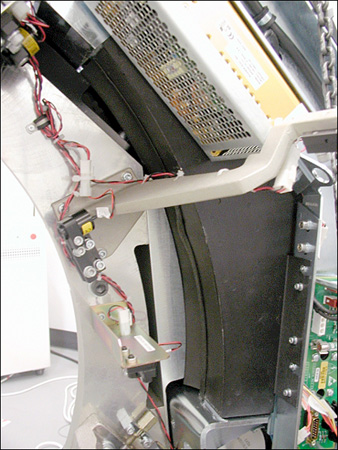
- Tuck the rubber shield underneath the HX under the bracket on the rotating
base. See Figure 7.
Figure 7. Rubber Shield Tucked
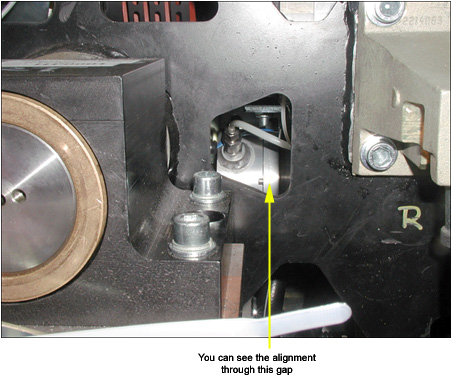
- Visually check to see if the lower front mounting hole is aligned through
the small cutout in the gantry frame. See Figure 8. If you are aligned move on, otherwise loosen upper bolts
and align.
Figure 8. Checking Alignment
- Apply “preload” torque to the UPPER M12 mounting bolts:
- Disconnect the hoist from the HX.
- Disengage rotational lock.
- Rotate the gantry so the tube is at the 3 o'clock position and you can reach the lower HX mounting points.
- Apply “preload” torque to the LOWER M12 mounting bolts:
- Make the following HX connections:
- J1, J2, J7 on Power Interface board.
- X-Ray tube to HX hose.
- Secure the quick disconnect safety locking mechanism. The torque spec.
for the quick disconnect safety mechanism is 9.9 N-m (7.3 lb-ft, 88 lb-in,
101 kg-cm), however, if the locking mechanism rotates in relation to the quick
disconnect, tighten slowly until it does not do so.note:
Do not severely overtighten the M6 bolts. Doing so can cause the quick disconnects to leak.
- Rotate the gantry so the tube is at the 4 o'clock position.
- Apply final torque to the two UPPER mounting bolts:
- Install HX Pump. See Heat Exchanger Pump Replacement procedure for installation directions.
- Reattach the cover on the Power Interface Board.
- Make sure you reattach any tie wraps that you removed.
- Reattach Gantry Contact Switch support bracket. See Figure 5.
- Reattach Gantry Right Front cover mounting bracket. See Figure 1.
3 Finalization
Procedure
- Ensure that proper torque specifications (see Torque Wrench Information) are followed for all fasteners.
- Run the Gantry Balance Procedure (Pro16, RT) to ensure that the gantry is safe for all rotation speeds.
- Ensure that the clamp installed in Step 10 is removed, if applicable.