- Topic ID: id_16157756
- Version: 3.0
- Date: Mar 6, 2020 10:00:21 PM
Gantry Balance Procedure (Pro16, RT)
Prerequisites
Overview
This procedure should be performed any time the rotating gantry is serviced. It is intended to 1) Check or create sensitivity matrix, and 2) Balance the gantry in both static and dynamic vectors. To perform the gantry balance:
-
Remove gantry front and rear covers.
-
Launch Service Gantry Balance program.
-
Carefully follow directions within the program.
-
Torque all fasteners.
-
Assemble the gantry.
Procedure
- Review the information in the Safety Section, above.
- Position the table to its lowest position.
- Remove the gantry side, top, front and rear covers.
- Launch the Service Gantry Balance program from the Service Desktop,
Replacement Procedures tab.
Figure 1. Sample Gantry Balance GUI
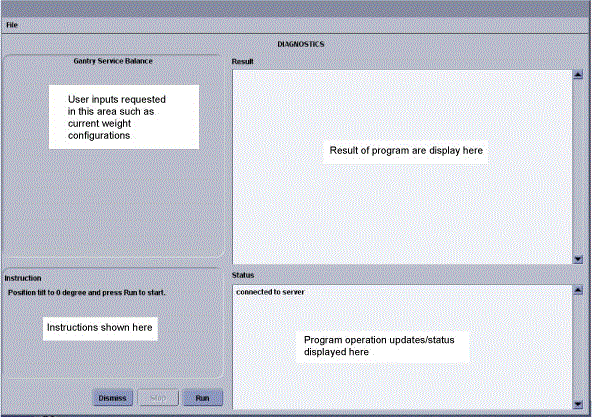
- Select Run to start the gantry balance procedure.note: Follow the on screen instructions exactly as stated. Failure to follow the steps may result in having to start the procedure from the beginning.
- If the sensitivity matrix does not exist or the gantry is out of balance,
the program will ask you to enter the current weight configuration prior to
performing the steps to generate a new sensitivity matrix. See Figure 5 for example of entries for 107° weight
stack. The 180° weight stack appears in the same manner.note: There is a weight diagram available via the “Weight Diagram” button in the GUI. See Figure 2. The diagram shown on the product supersedes any listing in this procedure. Pay close attention to Note 2 for the 180° 25.4mm spacer and 3.2mm shim orientation. The holes are shifted to one side and should be installed with the holes closest to the edge on the bottom near the DAS.
Figure 2. Sample Weight Diagram
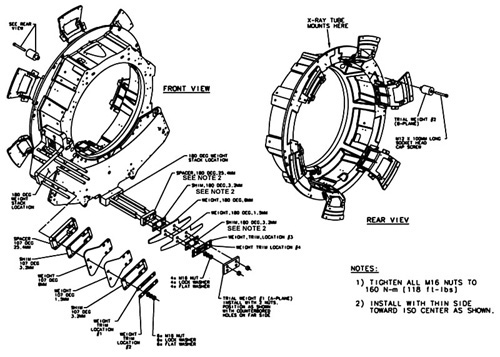 note: For a larger PDF version of the above illustration, click on the pdf icon below:
Figure 3. Sample Weight Diagram
Weight Diagram.pdfRefer to Figure 4 for Trial weight placement during sensitivity matrix generation process.
Figure 4. Trial Weight A and B Mounting Locations
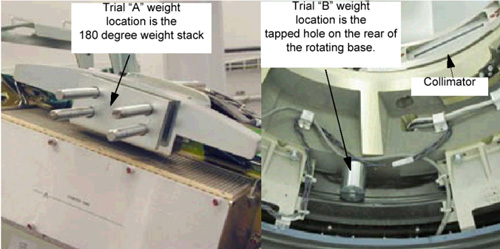
Program will ask you to place each of the two trial weights one at a time during the process.
Trial weight A at 180° position must be installed over top of the existing weight stack nuts such that existing nuts are in recessed holes of trial weight. Install trial weight as shown in the Weight Diagram on the system. This is the configuration and weight components expected by the program.
Figure 5. Request for existing weight configuration
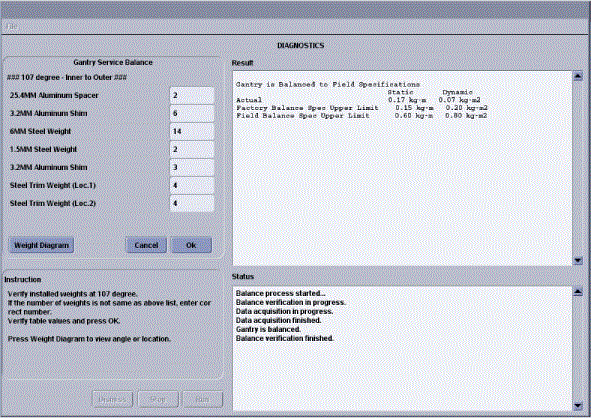 note: The order of the balance weights as installed on the gantry is very important. An entry of zero is valid if the particular weight type is not currently installed.
The program will ask or instruct the user about the number of specific weights in 107 and 180-degree locations. The order is labeled as "inner to outer" with inner referring to weights closest to the gantry (rear) and outer as towards the table (front).
- Follow the steps as stated in the “Result” portion of the
GUI screen as you proceed through the Gantry Balance procedure. Those steps
will not be included here as they may change from release to release of the
product.
See Table 4 for example questions and messages that may come up depending on system status and answers to other questions during program execution. Message wording may not be exactly the same as shown below.
- When the Gantry Balance procedure indicates a passing result save the updated configuration information and exit the program.
 warning
- Make sure to torque all fasteners as instructed. Use the Torque wrench
ordered from the tool depot to tighten the nuts on the threaded rods using
the following process. This torque wrench is a 1/2” drive necessary
for the deep well socket and is capable of 250 lb-ft (339 N-m, 3,457Kg-cm)
- First tighten all nuts to 50% of the full torque value, which is shown
in Table 5. This will insure
all nuts are all uniformly tight prior to applying final torque.
- After all bolts are torqued to the initial value, torque all to the
final torque value shown in Table 6:
Be aware that adjacent nuts might loosen when a nut is tightened due to the springiness of the stack. Use a diagonal type pattern (similar to tightening tire lug nuts) to tighten the nuts and go back to verify all are still torqued properly when complete. Refer to Gantry Service Balance Theory for further discussion regarding the importance of torque on the weights.
note: Refer to Gantry Service Balance Theory for explanation regarding torque as it applies to this area. - First tighten all nuts to 50% of the full torque value, which is shown
in Table 5. This will insure
all nuts are all uniformly tight prior to applying final torque.
 |
Finalization
Assemble gantry and perform FASTCAL. Ensure no pop-up windows occur and gesyslog is error free.