- Topic ID: id_17423132
- Version: 4.0
- Date: Jan 20, 2020 8:33:26 PM
Rotating 48VDC 1kW Power Supply Replacement from Original 1.8kW Power Supply
Prerequisites
Overview
This procedure defines the steps necessary to replace the 1.8kW 48VDC power supply (5351847-3) to the 1.0kW 48VDC power supply (5721097).
note:
The 1.0kW 48VDC power supply can only be used on Optima CT660, CT680 and Revolution EVO with Merc40 detector.
1 Power Supply Assembly Removal
Procedure
- Remove gantry side covers and disable Axial drive and HVDC from
the Service Switch Panel.
Refer to
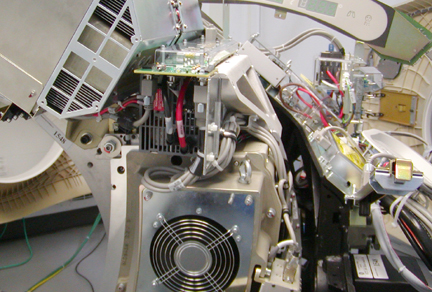
- Rotate the gantry to position the 48V power supply on the right
side of the gantry above the service switch panel and lock gantry
in position with rotational lock.
Figure 1. 48V Power Supply Assembly
- Stop the rotor of X-ray tube in case of Liquid Bearing Tube before HVDC off. Refer to Liquid Bearing Tube Rotor stop procedure for details.
 danger
- Turn off the gantry 120 VAC switch on the service panel. Power down the console and use LOTO procedures to make sure gantry power is removed.
- Remove the gantry top covers and front cover.
Refer to
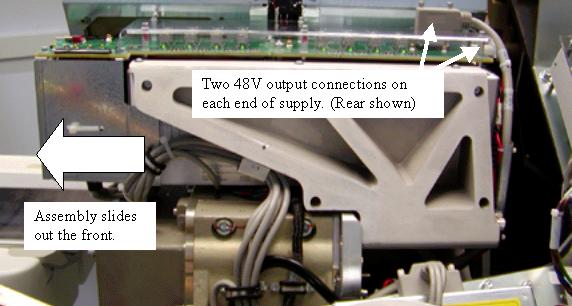
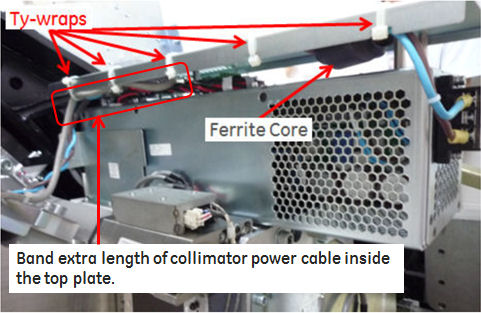
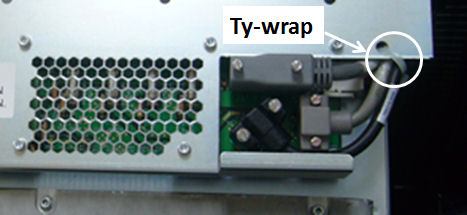
- Remove the Power supply output cables on the front and rear of the supply as shown in Figure 2 and Figure 3. Tywraps for the front cable support need to be removed as shown. Make note of any other tywraps removed during supply removal for reinstallation later. Also remove cable clamps attaching the output cables to the power supply assembly.
Figure 2. Example 48V Power Supply Front View
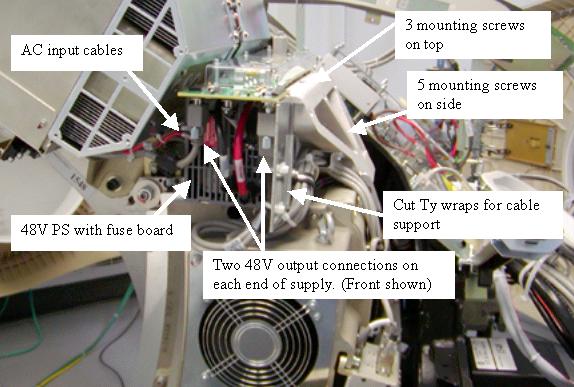
Figure 3. Example 48V Power Supply Side View
- Disconnect the AC input cables from the terminal strip on the front of the power supply.
- Remove the 8 mounting screws attaching the power supply assembly to the cast frame and slide the supply out the front of the gantry.
 |
2 Power Supply to Backplane Cable Replacement
Procedure
- Remove the existing 48V Power Supply J2 to DAS Backplane J51
Cable (P/N 5129366-2).
Figure 4. Cable Connector J2
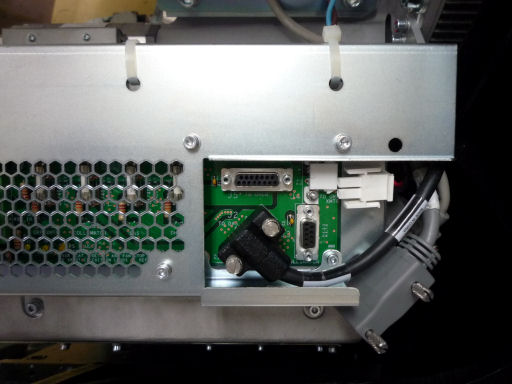
Figure 5. Cable Connector J51
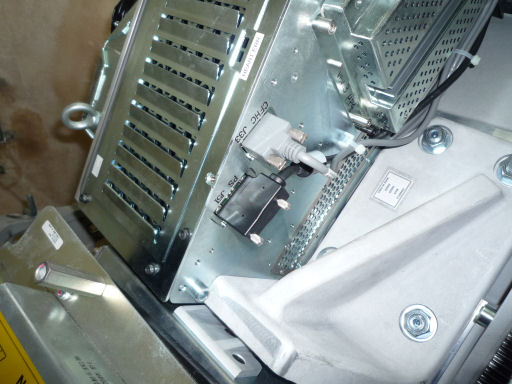
- Route the new cable (P/N 5719771-3) between 48V Power Supply
to DAS backplane J51 connector.
Torque the D-sub connector screws to the following value.
3 Power Supply Assembly Installation
Procedure
- Slide the new power supply assembly in from the front of the gantry.
- Install the 8 - M4 screws to attach the supply to the cast frame.
- warning
- Torque the 6 - M4 screws near the fuse board to the following
value:
- The 2 deep recessed screws are hard to get to if you do not
have a 3 inch long 3 mm driver bit. Either of the following 2 steps
can be used to tighten these 2 screws.
- Preferred method: Using a 3 mm (3 inch long) driver bit, torque
the 2 deep recessed screws to:
- Alternate Method: Using a 3 mm hex wrench seat the screws then
continue to turn 1/4 turn to apply sufficient torque. Do not over
tighten. Use the approximate force applied to torque the other 6 screws
as a guide to the force limit for these 2 screws. If either screw
strips out the threads of the power supply you will need to order
a new supply. Do not allow operation of the system with stripped mounting
screws.note:
Do NOT use this alternate torque method anywhere else in the system unless specifically defined by the service procedure.
- Preferred method: Using a 3 mm (3 inch long) driver bit, torque
the 2 deep recessed screws to:
- Reconnect input and output cabling to power supply assembly
as removed. Install Ty-wraps in all locations removed during supply
removal.
Torque the D-sub connector screws to the following value.
Figure 6. Ty-wraps Installation
- Torque the 120V input power connections (2 screws) to the following
value:
- Restore power to the system and gantry per LOTO procedures.
 |
4 Finalization
Procedure
- Check power supply output levels per 48 Volt Power Supply Checks.
- Perform a Gantry Rotation Safety Check.
- Check Gantry Balance to verify gantry is still balanced.
- Run DASToolsAuto Test to verify that no noise is introduced by the new supply.
- Turn OFF the Axial Drive, HVDC and 120 VAC switches on the gantry’s Service Switch Panel.
- Install the gantry front, top and left side covers.
Refer to
- Enable 120 VAC HVDC and Axial Drive service switches from the service switch panel. Press the table drives enable button on the lower right corner of the service switch panel.
- Install the gantry right side cover.