
- Discovery MR750w and SIGNA™ Architect T 3.0T System Service Methods
- 5690002-2EN Revision 4
- 00000018WIA30BB6410GYZ
- id_20044438.0
- Feb 24, 2021 12:57:45 AM
Checking the pneumatic patient alert system
Makes sure the stand-alone pneumatic patient alerts system is operating properly.
Prerequisites
| Personnel requirements | |||
|---|---|---|---|
| Required persons | Preliminary requirements | Procedure | Finalization |
| 1 | - | 5 minutes | - |
| Safety |
|---|
|
Before working in any GE Healthcare MR suite or performing any GE Healthcare service procedure, you must:
If you have any safety concerns at any time, do not begin work or immediately stop work and move to a safe location. Immediately contact your supervisor or site safety officer for instructions on how to proceed. |
The pneumatic patient alert system is a stand-alone system that allows the patient to alert the operator even when the console volume is turned down. Patient-to-operator contact is accomplished when the patient compresses a hand-held squeeze bulb that activates an audible and visual alarm near the operator. Either a pulse or steady audible tone can be selected at the control box. The operator must reset the control box to stop the alarms.
Procedure
- Make sure that the green LED on the control box is lit.
Figure 1. Pneumatic patient alert system 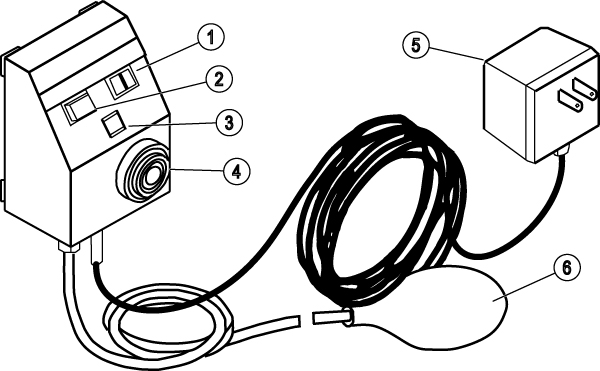
1 Steady/pulse switch 2 Reset button 3 LED 4 Audible alarm speaker 5 Power supply 6 Squeeze bulb