Signal To Noise Check-Surface Coils
Prerequisites
note:
The Body SNR Sphere Phantom, 46-265635G4, is not provided with the System. If the Body SNR sphere is needed, the customer must order it. A Body Loader is provided with the system.
Procedure
- At the operator workspace, select the scan icon in the desktop control panel.
- If necessary, exit out of any previous exams by selecting End Exam.
- Click on New Pt and enter the following:
- Id: geservice
- Name: snr check
- Weight (lb.): 111note:
Possible equipment damage. Completely remove the Quad Head Coil from the cradle before performing any body scans. Failure to do so may damage the Head Coil T/R Network.
- Remove the Quad Head Coil (if present) from the cradle.
- Place the surface coil to be tested on the table.
- Connect the coil connector to its mating connector in the Carriage Assembly.
- For Coils using the Universal Phantom:
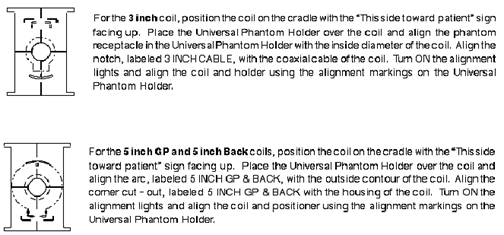
- Position the Universal Phantom Holder on the coil. Refer to Figure 1 for specific details for each coil type.note:
The General Purpose (GP) Flex Coil uses the Head Coil TLT phantom and loader for its phantom (not the Universal Phantom). Refer to Step 8 for General Purpose (GP) Flex Coil setup details.
Figure 1. UNIVERSAL PHANTOM HOLDER SETUP
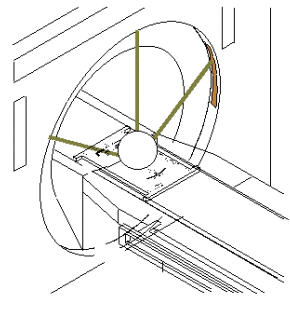
- Place the 100-mm phantom in the phantom receptacle, LANDMARK, and MOVE
TO SCAN. See Figure 2.
Figure 2. LANDMARKING UNIVERSAL PHANTOM
- Position the Universal Phantom Holder on the coil. Refer to Figure 1 for specific details for each coil type.
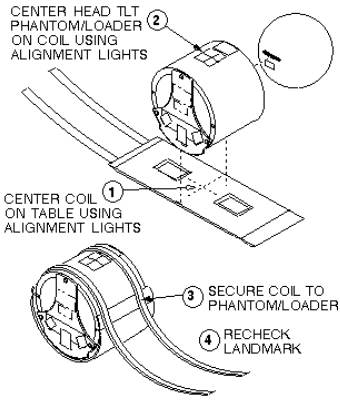
- GP Flex Coil Setup: Set up Flex Coil per Figure 3. LANDMARK, and MOVE TO SCAN.
Figure 3. GP FLEX COIL PHANTOM SETUP
- At the operator workspace, prepare the system for an SNR Check (Surface Coils) scan using the scan protocol (o.13.7) shown in the "Service Protocols" procedure located on the service methods CD-ROM.
- Click on Autoview, just below the Autoview image display screen, to automatically display your images.
- Click on Save Series, then Prepare to Scan.
- Click on Auto Prescan to properly calibrate the RF power level for the 90-degree and 180-degree pulses.
- Click on Scan. Record the Exam number and Series number for SNR Calculations. After the first scan is complete, click on Scan again (two back-to-back scans).
- For analysis, see Section Image Analysis.
- Return to the main menu
Finalization
No finalization steps.