SNR Image Analysis
Prerequisites
The SNR tool retrieves two operator-selected images. Signal value is computed as the mean pixel value in an ROI covering 80% of the image. The image is analyzed to determine the center of the image for positioning the ROI. Subtracting the second image from the first creates a difference image and the same ROI is used to calculate noise from the subtracted image. The signal value, noise value, and signal-to-noise ratio are reported. There is an option to save the difference image with the results annotated.
Procedure
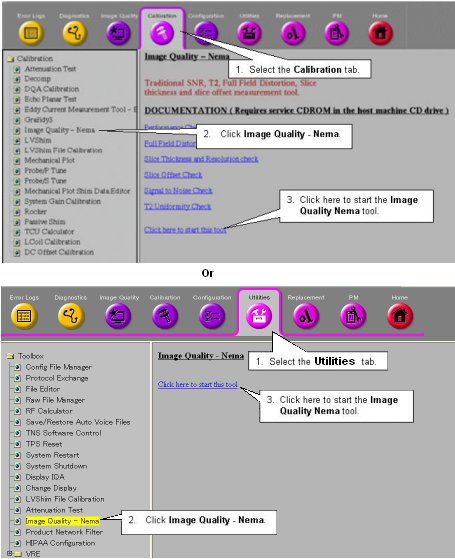
- On the Service Desktop Manager, click the Service Browser button. Follow
the instructions on Figure 1,
below.
Figure 1. OPENING THE IMAGE QUALITY NEMA TOOL FROM THE COMMON SERVICE DESKTOP
- For TwinSpeed, highlight the same GradMode as was used in section 2, 3 or 4 above, then click on OK.
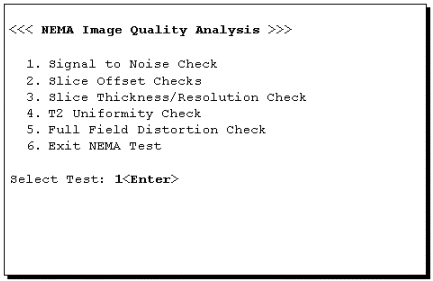
- A NEMA Image Quality window will appear on the desktop. Type 1 and
press Enter for the Signal to Noise Check. See Figure 2.
Figure 2. NEMA IMAGE QUALITY MENU
- Refer to Illustration 5-3 for the next steps.
Figure 3. NEMA IMAGE SELECTION MENU
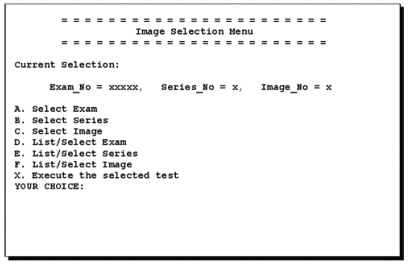
- At the prompt, type A (Select Exam) and then enter the exam number.
- At the prompt, type B (Select Series) and enter the series number.
- Type C (Select Image) and enter the image number.
- Type X (Execute the selected test) to run the procedure.
You’ll be prompted “Choose Second Image.” Continue by doing the following:
- Type A and then enter the exam number.
- Type B and enter the series number.
- Type C and enter the image number.
- Type X to run the procedure.
The analysis then begins. The final values are displayed on the screen, as shown in Figure 4.
Figure 4. SNR RESULTS SCREEN
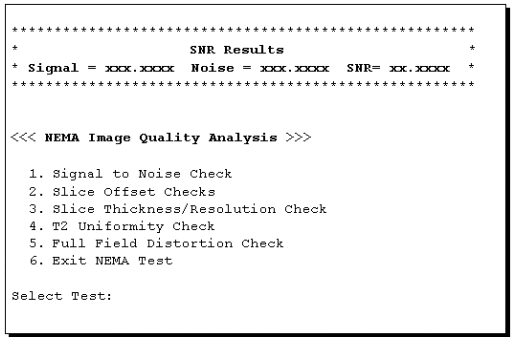
- Record Signal, Noise, and Signal-to-Noise in the Data Sheet at the end of this document. For TwinSpeed, identify the GradMode used.
- Repeat steps Step 5 through 12 above, selecting the next exam for the analysis of each remaining image pair.
- Keep the completed data sheets with the system data sheets for future reference.
- Type 6 and press Enter to exit the NEMA Image Quality Analysis Menu.
- Return to the main menu
Finalization
No finalization steps.