PS for PHPS Lite 2
Prerequisites
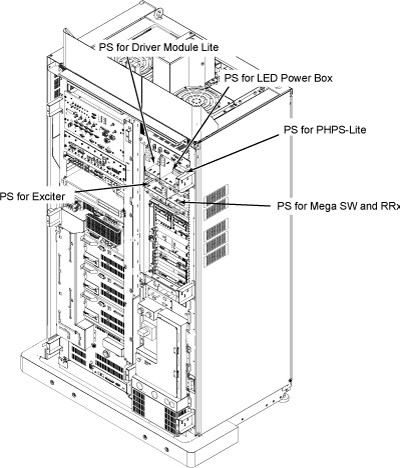
Location of each Power Supply is as following illustration
Figure 1. Location of Power Supply
Procedure
- Remove Front Cover. Refer to SC Cover Removal.note:
PS connectors are designed to be uniquely connected to the other end to avoid the mis-connection except Receiver and Exciter cable connectors.
- Disconnect the connectors which are routed from PS for PHPS Lite 2. If necessary, cut the tie wraps.
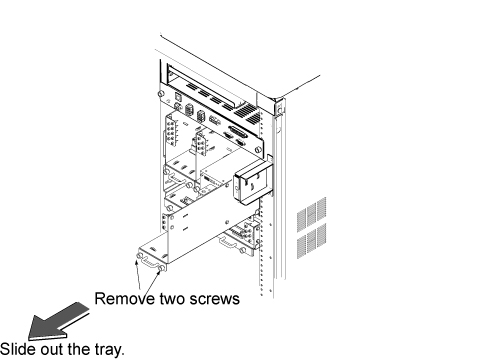
- Loosen 2 screws tightening power supply and chassis.
- notice
- Remove the PS for PHPS Lite 2 tray from System Cabinet.
Figure 2. PHPS Lite 2 power supply
- Restore new PS for PHPS Lite 2 tray by the reverse order of removal.
- Restore the system cabinet by the reverse order of the removal.
 |
1 Finalization
Procedure
- Restore the Power. Refer to System Cabinet PDU Main Breaker LOTO Procedure.
- Run one head or body scan.