PHPS Lite Functional Check
Prerequisites
1 PHPS Diagnostics
Procedure
- Run the PHPS Functional Diagnostic.
- Open Common Service Desktop.
- Select 'Diagnostics/System Function /Patient Handling/PHPS Functional Diagnostic'.
- Select 'IO Status' and Select 'Run'.
Figure 1. PHPS Functional Diagnostic
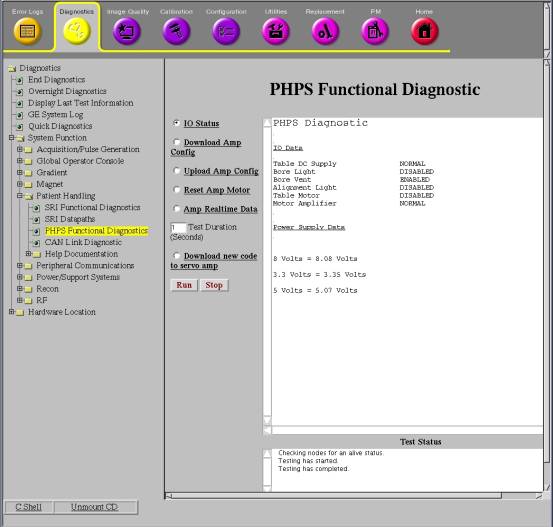
- Check that the results satisfy the specification. See Table 3 for Specification.
2 LED Power Box and Dock Voltage Check
Procedure
- Remove left rear pedestal cover. (Refer to Pedestal Cover Remova Rear l)
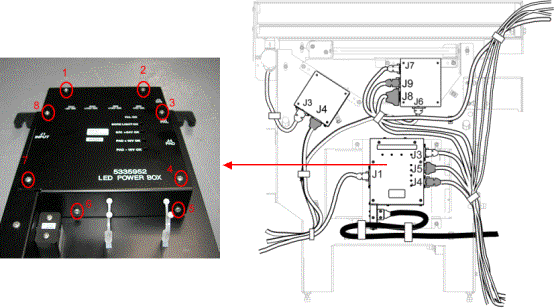
- Unscrewing eight bolts that fix the cover of LED Power Box (see Figure 2).
Figure 2. Bolts on the cover of LED Power Box
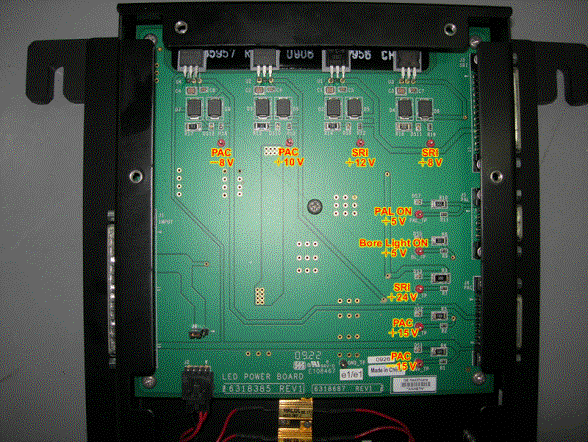
- Open the cover of the LED Power Box, there are nine test points
in the inner circuit board.(See Illustration 3), Check the voltage
at test points with Digital Voltage Meter. See Table 2 for Specification.
Figure 3. LED Power Box Voltage Check
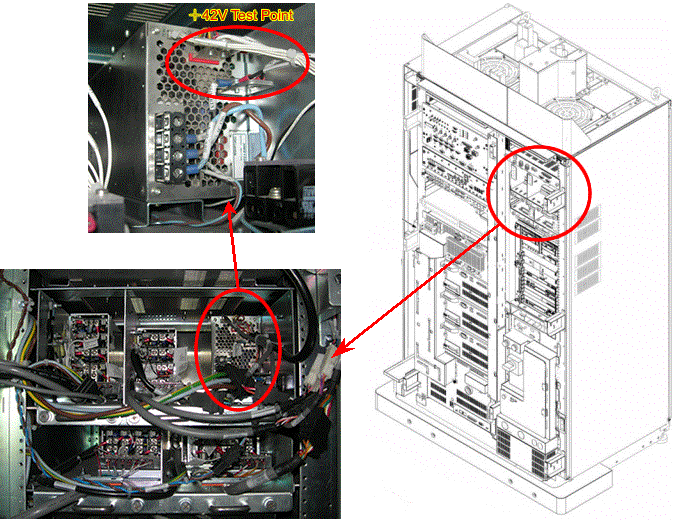
- The Dock power is located in the system cabinet. Refer to Illustration
4 to check the +42V DC for Dock. See Table 2 for Specification.
Figure 4. Dock Voltage Check
Finalization
Perform TPS Reset.