PDU EMI Filter
Prerequisites
Procedure
- Remove SC Front Cover and Rear Cover. Refer to SC Cover Removal
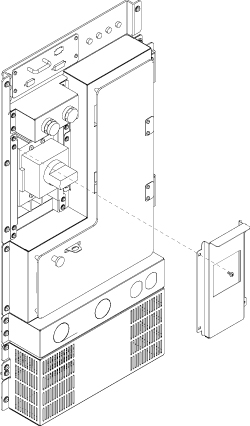
- Remove Main Breaker Panel from front side.
Figure 1. Remove Main Breaker Panel
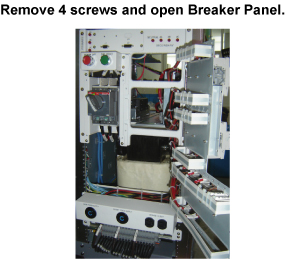
- Open Breaker panel by removing four screws.
Figure 2. Open Breaker Panel
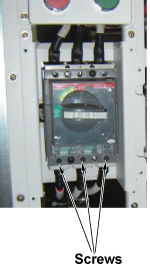
- Disconnect 3 cables from under side of Main Breaker. Use 5mm
hex wrench to loosen screws
Figure 3. Remove 3 Cables of Main Breaker
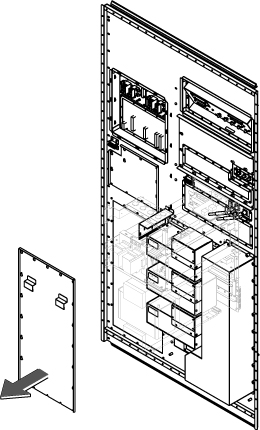
- Remove PDU access cover by loosening 20 screws.
Figure 4. Remove PDU Access cover
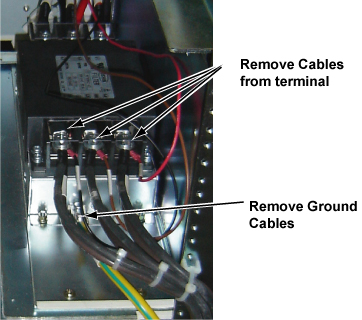
- Disconnect all cables from rear terminal of EMI Filter.note:
If any cable is disturbing the removal of EMI filter cables, temporary disconnect the cables. Do not forget to restore after replacement.
- Remove Ground Cable.
Figure 5. Terminals and Screws
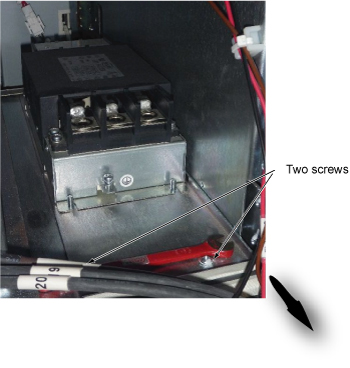
- Remove two screws at the EMI filter panel and slide toward the
rear side to disconnect the plate.
Figure 6. Remove Filter from SC front side
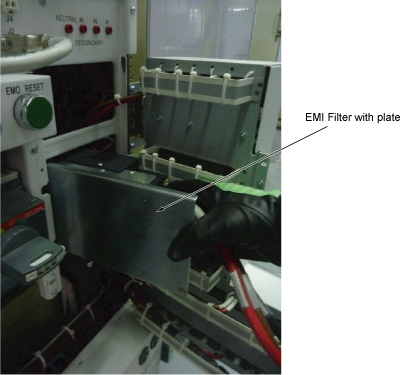
- Remove the EMI Filter with plate from the front opening as Figure 7.
Figure 7. EMI Filter Removal
- Remove EMI Filter from the plate.
- Remove main breaker cables from the defective EMI Filter and connect them to the new EMI Filter.
- Restore the Filter by the reverse order of the removal.note:
If any cable is disconnected during the procedure, do not forget to restore.
1 Finalization
Procedure
- Restore Power for main input circuit breaker.
- Restore the Power. Refer to Lockout / Tagout for MDP(Main Disconnect Panel) or Facility PDU .
- Run one head or body scan.