MIC with cable Replacement
Prerequisites
Procedure
- Remove the Cable and track assy. Move it to the open space.(Outside of Magnet Room) Refer to Cable and Track Assy Replacement .
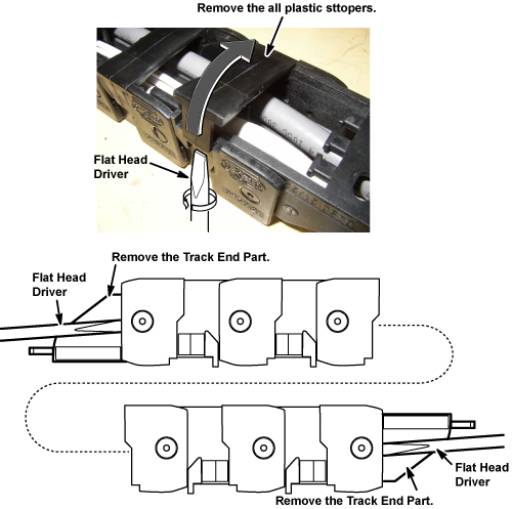
- Remove all the plastic stoppers from track assy.
- Remove the two Track End Part from Track Assy.
Figure 1. Two Track End Parts
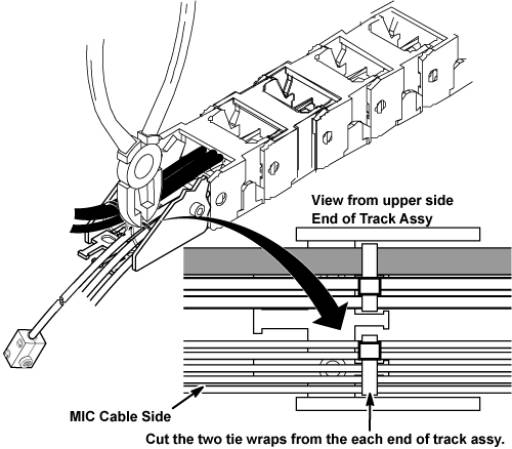
- Cut tie wraps from the each end of track assy.
Figure 2. Cut tie wraps
- Remove MIC cable from cable and track assy.
- Restore new MIC cable from MIC side.
- Restore Cable and Track Assy by the reverse order of the removal.note:
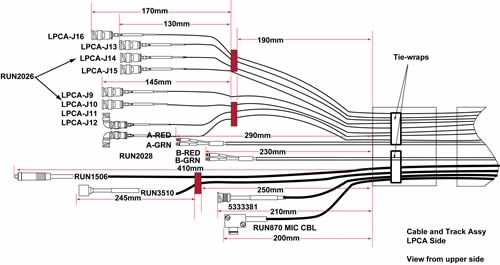
Fix the MIC cable length at 160 mm from tie-wrap point.
Figure 3. MIC cable length of LPCA side
 note:
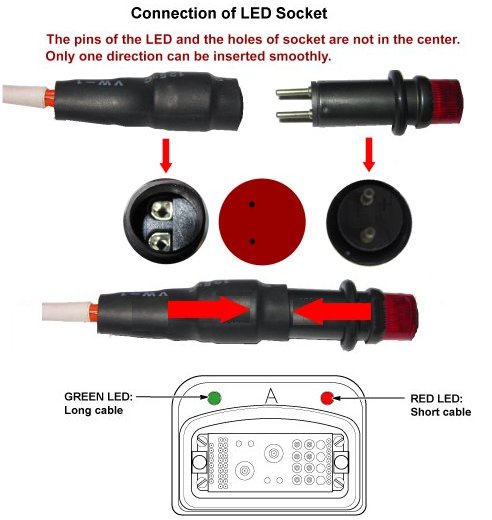
note:Connect the LED cable so that the cable is centered to the LED itself.
Figure 4.
Finalization
- Restore the Power. Refer to Lockout / Tagout for System Cabinet PDU Main Breaker.
- Check intercom function. Basically, intercom adjustment of GOC Audio Box is not required. If necessary, perform Intercom Adjustment for GOC Audio Box as troubleshooting.
- Perform MCR test.
- Perform Signal to Noise - Head Scan.