Gradient Filter
Prerequisites
Procedure
- Remove SC Rear cover of magnet room side. Refer to SC Cover Removal
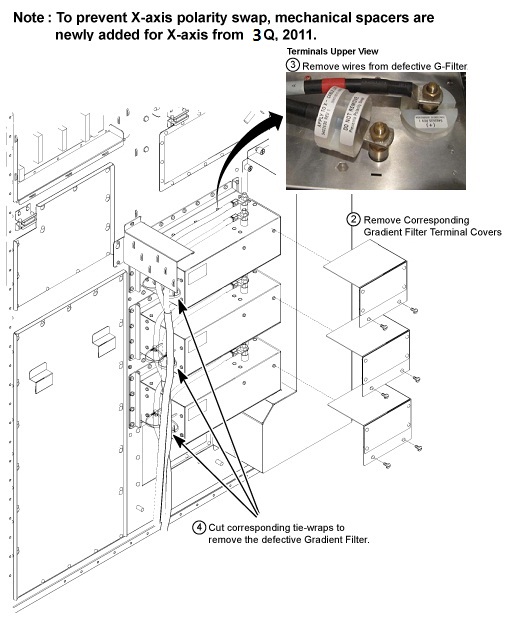
- Remove the terminal Cover for defective Gradient Filter by removing 2 screws from gradient filter.
- Check the voltage between Ground Stud and each terminal (+ or -). Verify that there is no voltage.
- notice
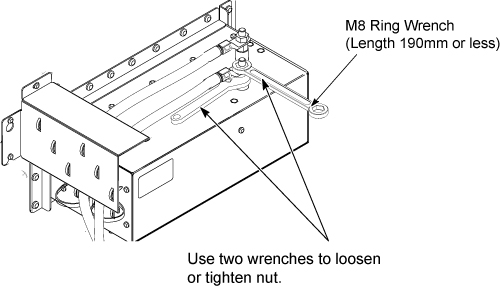
- Remove the cable from defective gradient filter while keeping
the spacer on cable intact.note:
Use two wrenches as illustration to tighten the nut. Need to tighten with enough torque to avoid spike noise. But, do not over tighten not to break stud.
- Cut tie-wraps at defective Gradient Filter.
Figure 1. Remove the all cables
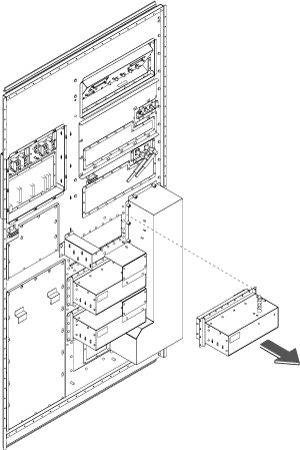
- Remove the 24 screws from frame of gradient filter.
- Remove gradient filter from Penetration Panel.
Figure 2. Remove Gradient Filter
- Restore the Gradient Filter by tightening 24 screws. note:
Make sure to tighten each screw.
- Connect Gradient Cables. Make sure screw is fixed, nut is tight,
and cable is not detached from terminal.note:
Use two wrenches to tighten the nut.
- Restore terminal Cover and restore Cabinet cover.
 |
1 Finalization
Procedure
- Restore the Power. Refer to Lockout / Tagout for PDU in System Cabinet.
- Perform Geometry Verification.
- Perform Signal to Noise - Head Scan.