Dock Motor Gear Assembly Adjustment
Prerequisites
The Dock Motor Speed Procedure is required as part of set-up and calibration. Procedures for opening magnet enclosure covers and adjusting patient dock hardware (Motor On Switch Actuation Adjustment, and Dock Motor Speed Adjustment) are provided in case related Dock problems arise. The dock motor gear box has a clutch that prevents backlash on the gears in the gear box. This clutch is not intended to regulate dock motor speed. (Reference Dock Motor Speed Adjustment.) This clutch simply prevents gear backlash which would make the gear assembly noisy. Perform procedures in Cam Adjustment Procedure, Motor Tube Spring Check, and Clutch Adjustment in the sequence presented, to correct excessive gear assembly noise. There are three probable causes of a noisy gear assembly:
-
Cam improperly adjusted
-
Excessive play on motor tube spring
-
Clutch improperly adjusted
1 Cam Adjustment Procedure
Procedure
- Refer to the appropriate OSHA LOCKOUT/TAGOUT REQUIREMENTS.
- Undock patient transport.
- Remove dock assembly from dock support by removing nuts and
washers. (Figure 1).
Figure 1. DOCK ASSEMBLY R/R
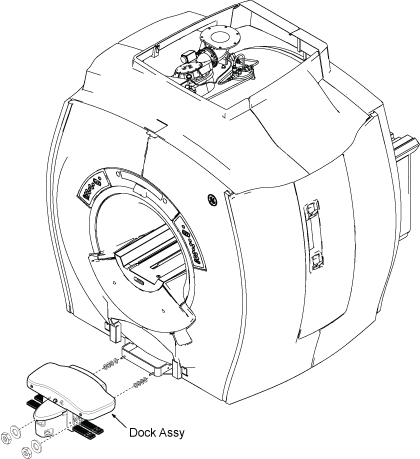
- Slide dock assembly away from magnet enclosure to gain access to cable connections.
- Remove all cables connected to Dock Assy.
 warning
- Slide dock assembly out of scan room, observing danger precautions noted above.
- Remove four mounting bolts from main dock cover (Figure 2).
Figure 2. DOCK COVER REMOVAL
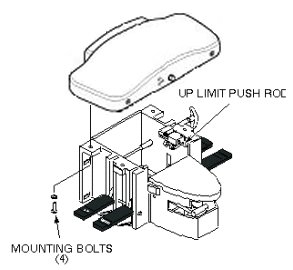
- Slide main dock cover forward until Up Limit switch push rod just clears dock cover holes (Figure 2).
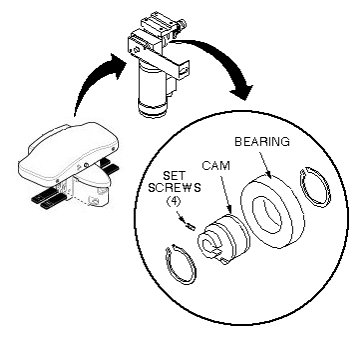
- Check four set screws on motor cam (Figure 3).
If set screws are loose, apply Loctite 242 and Primer T to set screws
and tighten. Allow fifteen minutes to harden.
Figure 3. DOCK MOTOR CAM ADJUSTMENT
- Carefully position main dock cover so that Up Limit switch push rod is aligned with upper hole in dock cover (Figure 2).
- Replace main dock cover and secure with four mounting bolts.
- warning
- Restore cables to Dock Assy.
- Attach small trim plate on front enclosure skirt, just above cutout (Figure 1).
- Install dock assembly to magnet enclosure with attaching hardware (Figure 1).
- Restore System power.
- Dock patient transport.
- Exercise Table Up pedal to see if gear noise has been eliminated. If not, remove dock assembly as detailed in Cam Adjustment Procedure, and perform Motor Tube Spring Check- Motor Tube Spring Check.
 |
|
2 Motor Tube Spring Check
Procedure
- Remove main dock cover outside of the scan room as detailed in Cam Adjustment Procedure.
- Check play between tube spring and motor mounting bracket (Figure 4).
Figure 4. MOTOR TUBE SPRING
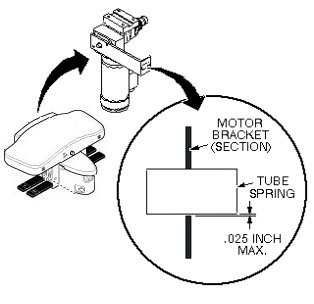
- If play is more than 0.025 inch (0.6 mm), replace tube spring.
- Replace main dock cover on dock assembly, move into scan room, heeding danger precautions, and reinstall dock assembly on magnet enclosure as outlined above.
- Restore power.
- Dock patient transport.
- Exercise Table Up pedal to see if gear noise has been eliminated. If not, remove dock assembly as detailed in Cam Adjustment Procedure and perform Clutch Adjustment Clutch Adjustment.
3 Clutch Adjustment
Procedure
- Remove main dock cover outside of the scan room as outlined in Cam Adjustment Procedure.
- Loosen set screw on clutch adjustment knob (Figure 5).
Figure 5. DOCK MOTOR CLUTCH ADJUSTMENT
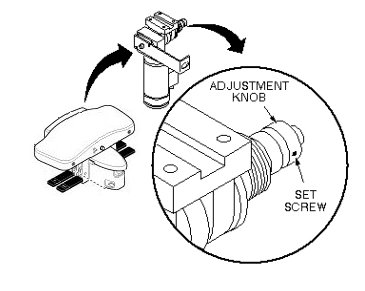
- Adjust knob two clicks tighter (clockwise), and tighten set
screw.note:
Do not adjust clutch more than two clicks at a time. The clutch should not be tightened to the point where it affects the dock motor function.
- Replace main dock cover on dock assembly, move into scan room heeding danger precautions detailed in Motor Tube Spring Check, and reinstall dock assembly on magnet enclosure.
- Restore power.
- Dock patient transport.
- Exercise the Table Up pedal to see if gear noise has been eliminated. If not, remove dock assembly as detailed above and repeat adjustment procedures as detailed in Cam Adjustment Procedure through Clutch Adjustment.
Finalization
No finalization steps.