DC Offset Adjustment
Prerequisites
DC Offsets will need to be run during the initial system calibration, at the time of system upgrade (i.e. EXCITE 2 to EXCITE 3) or if the GP or SGA has been replaced.
Procedure
- Go to the Service Desktop and select Calibrations from the Service Browser. See Figure 1.
Figure 1. Selecting DC Offset Calibration in the Service Browser
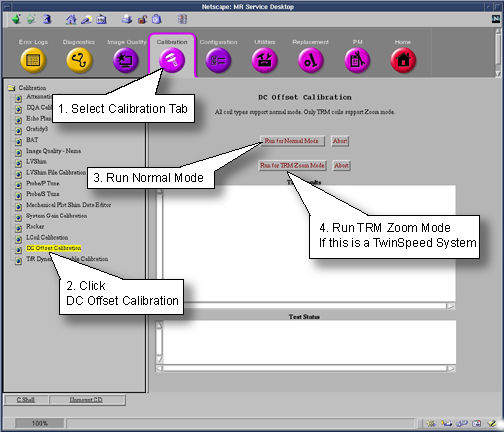
- Select DC Offset Calibration, then Run for Normal Mode or Run for TRM Zoom Mode. You will need to run both modes if your system is a TwinSpeed.
Whole and Zoom will run and after completion results will display in the Test Results Box.
A report of “DC Offset calibration has been completed” signifies that the calibration is done. The calibration should only be run once for each mode (Whole or Zoom).
- The calibration values for ACGD are stored in /usr/g/caldir/gram_tune.dat.WHOLE for Whole Body coil (or gram_tune.dat.ZOOM for
Zoom coil) file.
For HFD the values are stored in /usr/g/caldir/gradient_tune.dat.WHOLE or /usr/g/caldir/gradient_tune.dat.ZOOM. (Do not touch the Offset pots on the SGA’s.)
For HFD-S-Lite the values are stored in /usr/g/caldir/gradient_tune.dat .
note:The calibration values are relative to the site DC Offsets is run on and can vary greatly from site to site.
- Perform TPS Reset or end diagnostics.
- Go to grafidy 3
Finalization
No finalization steps.