Contactor for Night Mode
Prerequisites
Procedure
- Remove SC Rear cover of magnet room side. Refer to SC Cover Removal.
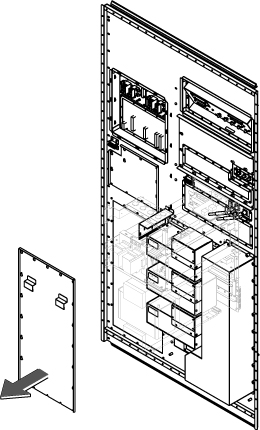
- Remove PDU access cover by loosening 20 screws.
Figure 1. Remove PDU Access cover
 note:
note:Contactor might be located behind the rear panel and it's difficult to remove the cables. In this case, remove the contactor first referring to Step 6. Then, remove cables.
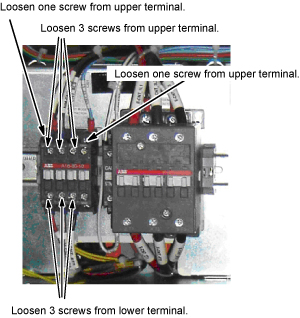
- Loosen 5 screws and disconnect 5 cables from the upper contactor terminal.
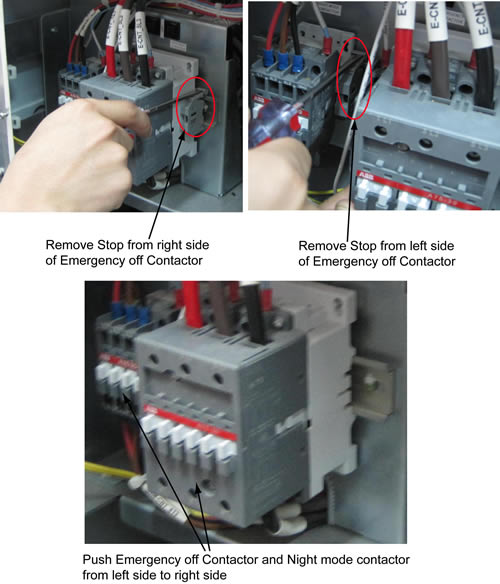
- Remove 2 stops. And then push Emergency off Contactor and Night
mode contactor from left side to right side.
Figure 2. Remove 2 stops and Push Contactors
- Loosen 3 screws and disconnect 3 cables from the upper contactor
terminal.
Figure 3. Remove cables
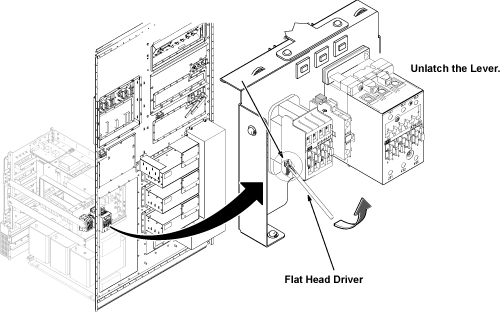
- Remove the contoctor by pulling the lever to lower direction
with flat screwdriver.
Figure 4. Contoctor Removal
- Restore contactor by the reverse order of the removal.
1 Finalization
Procedure
- Restore Power for main input circuit breaker.
- Restore the Power. Refer to Lockout / Tagout for MDP(Main Disconnect Panel) or Facility PDU .
- Run one head or body scan.