Cabinet Interface Board
Prerequisites
Procedure
- Remove SC rear cover. Refer to SC Cover Removal
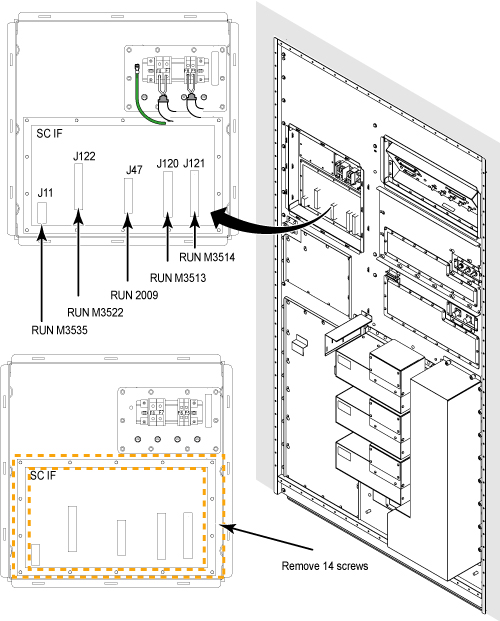
- Remove the cables from defective Cabinet Interface Board front side.
- Remove screws fixing Cabinet Interface Board and Penetration
Panel.note:
If it is difficult to remove cables or screws because of conflict of blower power cables, remove the blower power cables for easy operation. Do not forget to restore after replacement.
Figure 1. Cabinet Interface Board Cables
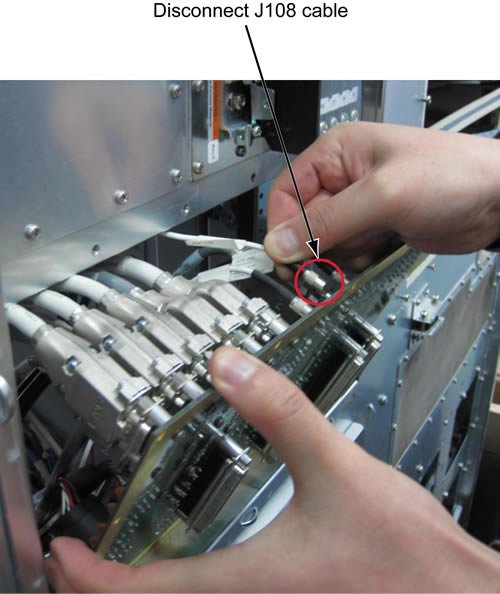
- Slowly rotate the SCIF board and first disconnect the cable
connected with J108 at the rear side of SCIF board.
Figure 2. Disconnect J108 cable
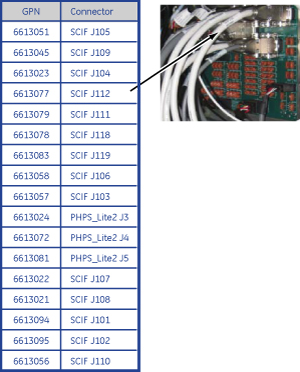
- Access the rear panel cables from Magnet Room side and remove
the cables from defective Cabinet Interface Board.
Figure 3. Remove cables from Cabinet Interface Board
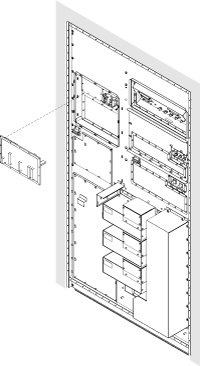
- Remove Cabinet Interface Board from Penetration Panel.
Figure 4. Remove Cabinet Interface Board
- Restore the Cabinet Interface Board by reverse order of removal.note:
Make sure to tighten each screw.
- Restore Cabinet cover.
Finalization
- Restore the Power. Refer to Lockout / Tagout for PDU in System Cabinet.
- Perform Signal to Noise - Head Scan.