CAM Lite 3 Fan Assy
Prerequisites
Procedure
- Remove L Upper Front Cover and R Upper Front Cover. SC Cover Removal.
- Disconnect the following connectors from front panel of CAM
lite 3 and HUB.
-
Ethernet switch (HUB): port 6, port 7, port 8
-
IXG: J8, J11, J13
-
PSE:J7, J10, J11, J12, J13
-
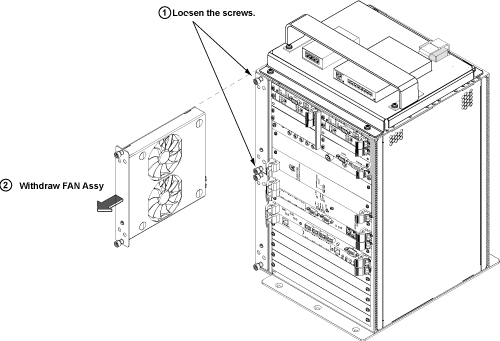
- Loosen the screws of FAN Assy.
- Draw out the malfunction fan from the CAM lite 3.
Figure 1. CAM lite 3 Fan Removal
- Restore System Cabinet by reverse order.
note:
The fan is plug and play with no cables. You can pull it out or push it in with ease.
Finalization
- Restore the Power. Refer to System Cabinet PDU Main Breaker LOTO Procedure.
- Run MGD Diagnostics to ensure proper functionality.
- Run one head or body scan.