• Object ID: 00000018WIA3020D260GYZ
  • Topic ID: id_2029967 Version: 2.0
  • Date: Feb 21, 2021 9:04:17 PM

Doing the Safety Calibration Check

These safety calibrations must be passed in order for the scanner to be capable of clinical scanning.

About this task

The Safety Calibration Check is used to check the calibration status of the scanner in non-proprietary mode and enables the scanner for clinical scanning if the calibrations are passed. This check requires that the minimum calibrations have been completed adequately in order to operate the system. Further calibrations will be required if greater image quality is desired. When the check is passed, clinical scanning can commence.

Procedure

  1. After installing or updating the software, the Safety Calibration Check must be done in order for the system to do clinical scanning.
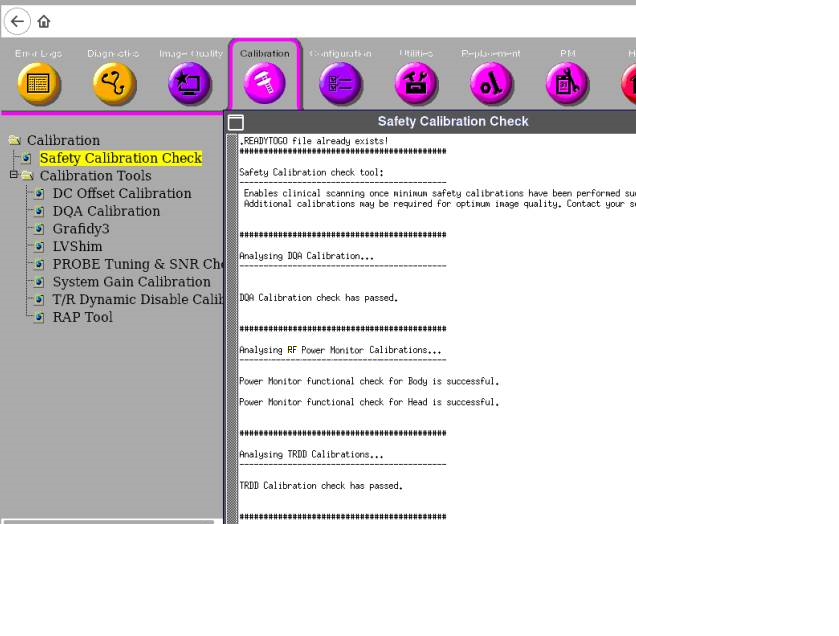
  2. From the Common Service Desktop select Calibrations > Safety Calibration Check.
    Note: Run this check without proprietary licenses loaded.
  3. Complete the following procedures to pass the Safety Calibration Check.
    Note: These calibrations must be passed in order for the scanner to be capable of clinical scanning.
    Table 1. Safety Calibration Check calibration procedures
    ProcedureTasks
    DQA CalibrationSee Doing DQA calibration.

    RF/UPM Cal & Functional Check (Body)

    RF/UPM Cal & Functional Check (Head)

    See Calibrating RF Amplifier and UPM.
    TR/DD CalibrationSee TR DD system path check.
    Check scanSee Doing a check scan.
  4. If the check passes, the following message will display.