- 00000018WHA30C772GYZ
- id_20016267.0
- Feb 21, 2021 9:03:51 PM
Running LVShim in Manual mode
About this task
Procedure
- Select the shim type (gradient, or test) and Manual Mode, then click Scan.
Figure 1. LVShim - manual mode 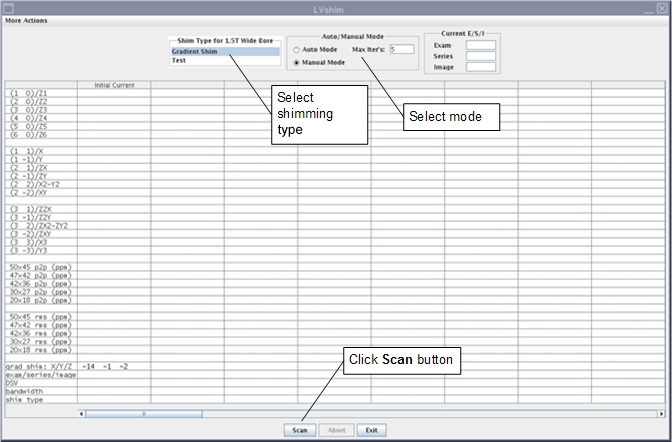 Note: The gradient shim bit resolution was increased by 16 times. This will result in gradient current values that are much higher than those observed in previous versions of this tool.
Result
After the scan is complete, the tool calculates harmonics and compares X, Y and Z to specifications.- Green cell = Passed specification
- Red cell = Failed specification
Figure 2. Gradient harmonics and gradient bits 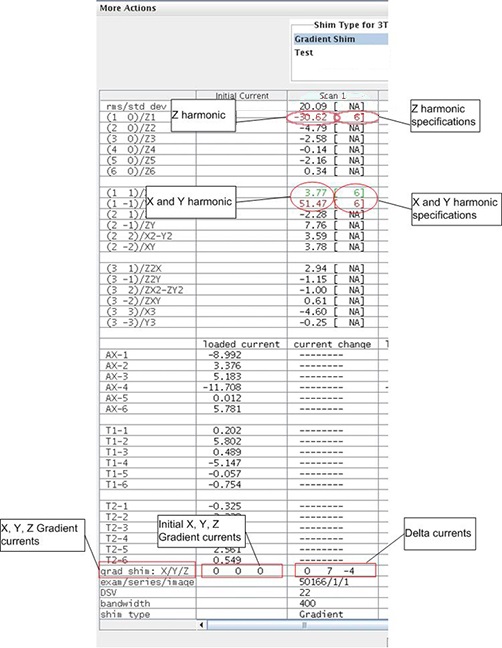
The tool calculates the X, Y and Z gradient delta currents (for gradient bits only) and the new currents based on the harmonics in another window.
Figure 3. Original delta and new currents (examples) 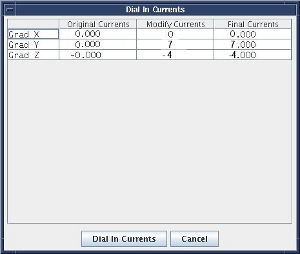
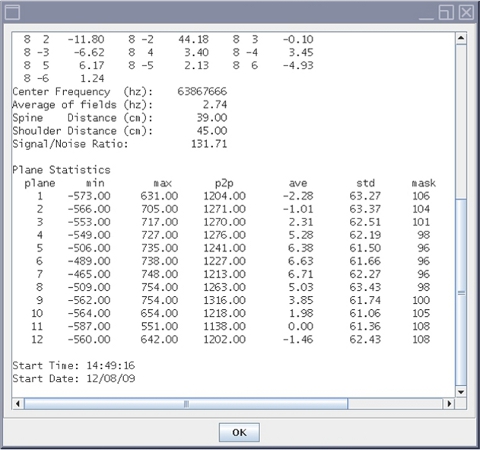
- For more details about the scan (cal file name, center frequency, etc.), select .
Figure 4. More information on scan