Remove the host computer from the GOC when upgrading the system.
Prerequisites
| Personnel requirements |
|---|
| Required persons | Preliminary requirements | Procedure | Finalization |
|---|
| 1 | - | 30 minutes | - |
| Tools and test equipment |
|---|
| Item | Quantity | Part number | Manufacturer |
|---|
| Screwdriver | 1 | - | - |
| Disk Management Tool | 1 | - | - |
| ESD Strap | 1 | - | - |
Procedure
- Remove the two screws that secure the left side panel of the GOC.
Figure 1. GOC left side panel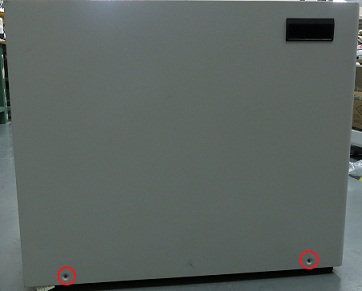
Note: The side panel has a short ground lead connecting it to the main chassis. When removing the side panel, do not strain this ground lead.
- Disconnect the short ground lead that connects the side panel to the GOC main chassis at the center of the lead.
Figure 2. Left side panel ground lead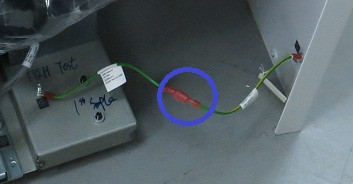
- Remove the left side panel and put it in a safe place.
- Make sure all the cables are properly labeled. If not, note their locations for reattachment.
- Remove all the cables connected to the computer.
- Remove the strap(s) from the computer.
- Remove the host computer from the GOC.
Loosen or remove the brackets if necessary.
