
- 00000018WIA30BDFD20GYZ
- id_131058633.1
- Dec 3, 2019 12:31:53 PM
1.5T Phased Array Shoulder Coil Setup for MCQA Test
Prerequisites
| Required persons | Preliminary requirements | Procedure | Finalization |
|---|---|---|---|
| 1 | Not Applicable | 15 minutes | Not Applicable |
| Item | Quantity | Effectivity | Part number | Manufacturer |
|---|---|---|---|---|
| 1.5T Head TLT Phantom | 1 | - |
46-265826G6 | - |
| Phantom Positioner | 1 | - |
2375136-3 | - |
| Curved Adapter Panel for Flat Table (GEM) | 1 | - |
5395828 |
Sumi Motherson |
| Condition | Reference | Effectivity |
|---|---|---|
|
Requires 22.1 software. | - | - |
|
The following coil configuration name must be installed to run this tool: HDx Shoulder. | - | - |
About this task
Follow this process to prepare for the MCQA test using the 1.5T 3 Channel Shoulder Coil (M7000AT).
Procedure
- Insert the Curved Adapter Panel Assembly into the magnet end of the table as shown.
Figure 1. Placement of Curved Adapter Panel Assembly 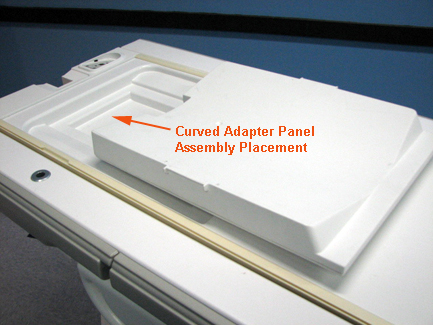
- Position the coil in the cradle, and connect the cable as shown.
Figure 2. Connecting Cable to Coil 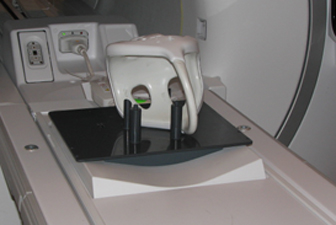
- Place a phantom in the coil.
Figure 3. Positioning Phantom in Coil 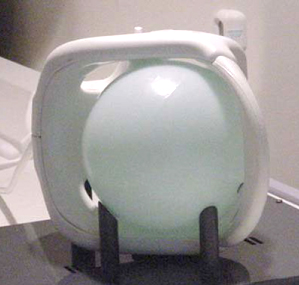
- Landmark on the coil crosshairs as shown.
Figure 4. Landmarking Coil on Crosshairs 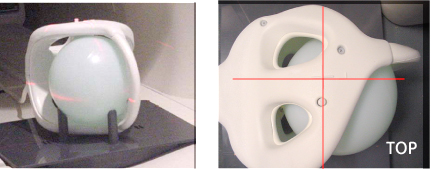
Finalization
No finalization steps.