
- 00000018WIA30E05E20GYZ
- id_131063483.0
- Aug 29, 2019 1:34:53 AM
Installing Service Methods
| Required Persons | Procedure Time |
| 1 | 20 minutes |
| Notice | |
|---|---|
-
Verify that you have the proper Service Methods DVD. Confirm the software release and field strength (1.5T or 3.0T) for the system.
-
Select Guided Install/FE Mode.
-
Click Click here to start this tool. (The password is operator.)
Note:It is possible that the customer changed the default password. If you cannot log in, contact the customer for the correct password.
-
Select Service SW/Insite.
-
Insert the Service Methods DVD.
-
Click Install Service Documentation .
Documentation installation takes about 17 minutes.Figure 1. Loading Service Documentation 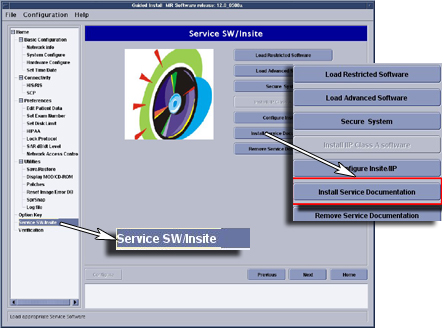
To remove the Service Documentation, click Remove Service Documentation. Removal takes about 30 seconds.