- Topic ID: BJ_200716_Z01
- Version: 3.0
- Date: Dec 29, 2020 1:01:20 AM
Liquid Bearing Tube Service Tool Impact
1 General
This document describes Service Tool Impact when Optima CT680 Series and Optima CT670 system with Liquid Bearing Tube.
2 Liquid Bearing Tube Rotor management
Liquid Bearing Tube requires unique rotor management in order to prevent rotor damage. The followings are basic constraint of rotor management.
-
Gantry rotates 2sec./rev. when rotor acceleration starts. (Some Service Tools can rotor start without the rule as exception)
-
Rotor rotating speed is Low or High. When rotor rotates with High Speed and it decelerates to Low speed 20 mins, past after End exam event.
When rotor rotates with low Speed and it decelerates to coasting 7 mins, past after switching from high speed.
-
Rotor rotates continuously unless E-Off, HVDC Off, or some service tools execution.
-
Rotor acceleration is required manually when rotates gantry faster than 2 sec./rev. because it does not start automatically.
Dedicated rotor control tool for Service engineer was implemented to manipulate rotor start or stop in any time (Refer to Rotor Control Tool with LB Tube - Command or Rotor Control Tool with LB tube - GUI (20BW25.x or Later) for details).
And Liquid Bearing Tube unique gesyslog messages were also implemented (refer to gesyslog for Liquid Bearing Tube manual for details).
Refer to the following Table for each Service Tool impact.
3 SWHWINFO / CHECK_CONFIG
The following shows the comparison of Tube type and example.
-
Liquid Bearing: Perenna
Example:
{ctuser@bay}[1] swhwinfo <Enter>
20BW25.5.H40_PN_CM64_G_GMV (Liquid Bearing Tube)
{ctuser@bay}[2]
4 Tube rotor damage prevention
Follow to the procedure Liquid Bearing Tube Rotor Control Thermal Guidance for Hot landing prevention to prevent X-ray Tube rotor damage.
5 Pop-up message for Hot landing prevention
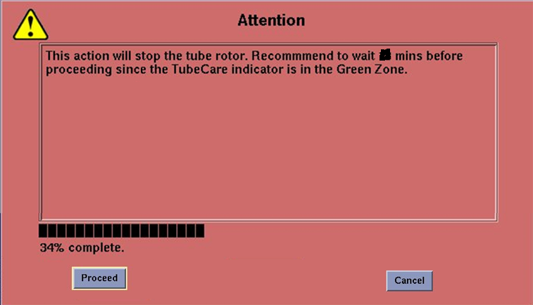
Using some service tools will stop the rotor (See Table 2). The following pop-up will appear, this is to inform service personnel that recommended waiting time to stop the tube rotor if tube is in “Green” temperature zone. Refer to the Figure 1 in case of pop-up appears.
Figure 1. Pop up message