- Topic ID: id_11038683
- Version: 3.0
- Date: Jan 27, 2022 12:50:56 AM
Laser Alignment Inspection
 |
|

 |
|
1 Setup
-
Adjust the room illumination to normal ambient customer working conditions.
-
Turn on the Laser Alignment Lights. (Press the Alignment Light button on the gantry control panel.)
-
Ensure all laser alignment lights are visible in the customer's ambient lighting conditions.
2 Internal Alignment Lights
-
Place a sheet of plain white paper over the output port of each light.
-
Verify that the two laser lines coincide with each other and appear as a single line.
note: GE designed the internal axial lasers on the current CT system to shine down on the collimator. Do NOT adjust the internal alignment lights at this time.
3 External Axial to Internal Axial Distance
-
Raise the table to its highest elevation.
-
Extend the cradle until both the internal and external laser lights shine on the cradle.
-
Place a metric rule on the right edge of the cradle, and measure the distance from the internal axial laser line to the external axial line. Verify this distance equals 240.0 mm ±1.0 mm.
-
Place the rule on the left edge of the cradle and measure again.
-
Leave the cradle in its current position and lower the table to the minimum elevation.
-
Measure the distance between the internal and external lights on both edges of the cradle, as above.
-
Verify that the distance between the internal and external lights remains equal to 240.0 mm ±1.0 mm.
4 Coronal Laser Inspect
-
Place a sheet of plain white paper at the left side of the patient opening, in front of the coronal laser light.
-
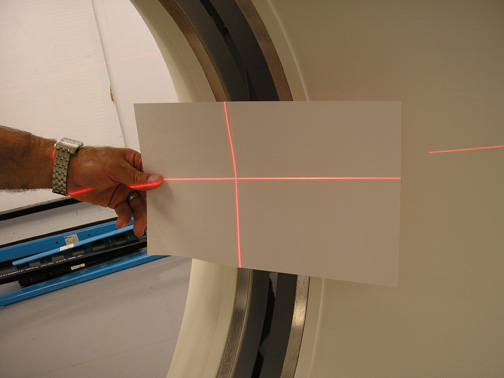
Verify that the two coronal lines coincide (see Figure 1).
-
Move the paper to the right side of the patient opening.
-
Verify that the two coronal lines coincide (see Figure 1).
Figure 1. Laser Coronal Lines Coincide
-
Place the paper in the center of the gantry opening.
-
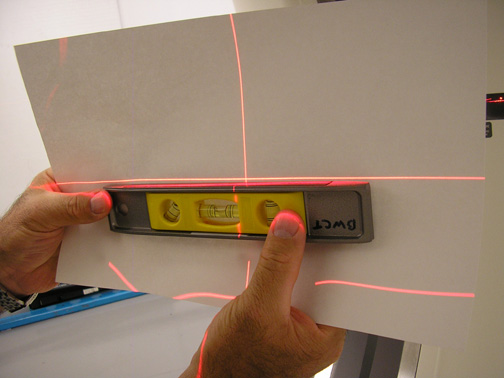
Use a level to verify that the coronal lines are horizontal (see Figure 2).
Figure 2. Verify Coronal Lines are Horizontal
-
Turn the Lights OFF. (Press the alignment light button on the gantry control panel, again, to turn the lights OFF.)
note: If any of the above tests fails, complete an Alignment Light Adjustment. (For procedures, see Alignment Light Adjustment.)