- Topic ID: id_17479572
- Version: 2.0
- Date: Jan 27, 2022 12:50:48 AM
Gantry Filter Cleaning and Rotational Checks
1 Safety
 |
|

|
|
2 Detector Plenum Filter Cleaning
-
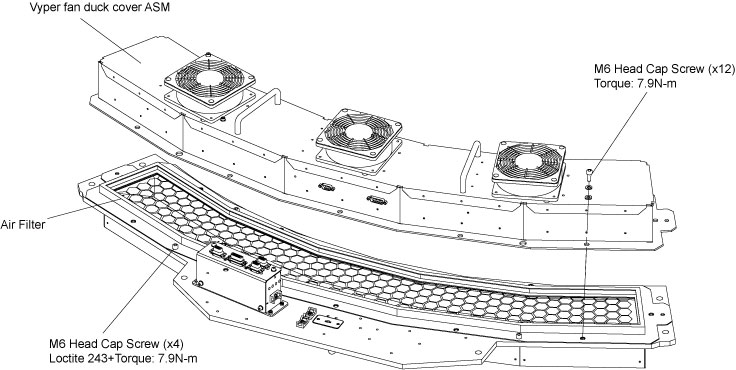
Remove the Vyper fan duck cover asm to access the filter assembly. (With the Vyper fan duck cover asm off, the filter is exposed for cleaning.) (For procedures to remove the fan duck cover asm, see Vyper DAS Air Filter Replacement.
-
Use the HEPA vacuum to clean the filter.
Figure 1. Filter
-
Reinstall the Vyper fan duck cover asm and connections, following the recommended torque specs found in the Figure 1.
-
Clean off any debris that may be on the detector face plate using warm soapy water.
3 Heat Blower Filter Cleaning
-
Press and hold the backward tilt button
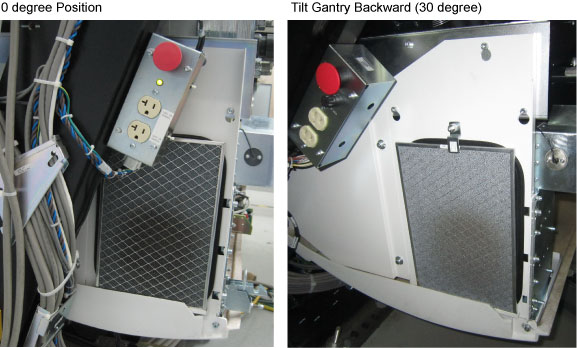
 from the gantry control panel, until tilt the gantry backward to 30 degrees. (Figure 2)
Figure 2. Heat Blower Filter
-
Initially vacuum the gantry filter while it is in place to avoid shaking dust and debris loose.
-
Remove the gantry filter and vacuum it from the front to pull the dust and debris out of the filter.
note:Vacuuming from the back first may pull dust deeper into the filter making it harder to remove.
Vacuum the back (after cleaning the front) to remove any dust that penetrated the filter.
-
Reinstall the gantry filter.
4 Gantry Top Cover Fans
Vacuum the fans on the top of the gantry cover.
5 Rotating Path Components and Cables Inspection
-
Remove the gantry rotational lock, if engaged.
-
Rotate the gantry by hand and inspect all cables in the rotational path for signs of wear.
-
Check that all cable keepers are installed and tight.
-
Inspect the gantry cover cable and confirm that all cable keepers are in place, and the cables are not falling into the rotational path.