- Topic ID: id_18480251
- Version: 4.0
- Date: Jan 20, 2020 8:32:31 PM
TGPHD Replacement
Prerequisites
Overview
This procedure defines the steps necessary to replace the TGPHD board.
1 Removing The TGPHD
Procedure
- Remove the gantry right side cover.
- Stop the rotor of X-ray tube in case of Liquid Bearing Tube before HVDC off. Refer to Liquid Bearing Tube Rotor stop procedure for details.
- notice
- Turn off all three (3) switches (Axial Drive, HVDC, and 120VAC) on the Service Switch Panel.
- Perform all required LOTO activities.note:
Front and rear access is required for this procedure.
- Remove gantry left side cover. If further access is required,
remove top and rear covers.
Refer to
- Remove the 8 thumbscrews in the TGPHD cover, then remove the cover.
- Disconnect all cabling into the TGPHD.note:
If the cables are not labeled, label them as they are removed.
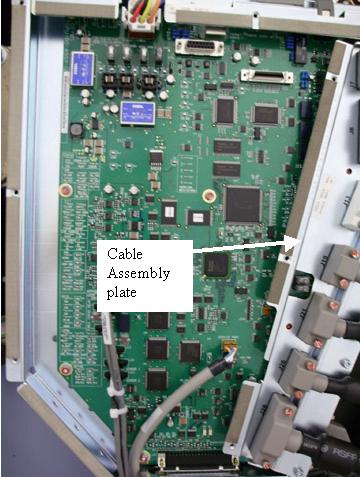
- Remove the cabling assembly plate.
Figure 1. TGPHD
- Remove the eight (8) screws attaching the TGPHD board.
- Remove the defective TGPHD.
 |
2 Install TGPHD
Procedure
- Put the new TGPHD board in place.
- Secure the board by replacing the eight (8) screws.
- Install the cable assembly plate.
- Carefully install all of the removed cables, making sure that no pins are bent during engagement.
- Remove LOTO, and power up everything except the gantry.
- Before powering ON the 120 VAC gantry power, open a shell (terminal)
window on the console and type the following
cd /usr/g/fw ENTER
touch tgpFtp ENTER
note:These commands must be performed to assure that the FLASH download procedure successfully downloads the TGPHD firmware from the OC, regardless of the status of the TGPHD programming.
- Turn ON all three (3) switches (Axial Drive, HVDC, and 120VAC) on the Service Switch Panel and press the E-stop reset.
- Execute Flash download query and update. Refer to the Flash download procedure if necessary.
- Perform the power supply adjustment procedure in the Finalization section of the TGPHD Power Supply Replacement.
- Turn off the Axial Drive, HVDC and 120 VAC service switches.
- Replace the TGP cover.
- Replace gantry covers except for the right side cover that allows access to Service Switch Panel.
- Turn on the 120 VAC, HVDC and Axial Drive service switches.
- Replace gantry right side access cover.
3 Finalization
Procedure
- Perform the System Scanning Test from the Functional Checks folder.