- Topic ID: id_16158015
- Version: 3.0
- Date: Dec 22, 2021 11:22:07 PM
Gantry Scan Window Removal and Re-Install
Prerequisites
Overview
This procedure explains how to remove and re-install the CT Gantry Scan Window.
1 Remove Scan Window
Procedure
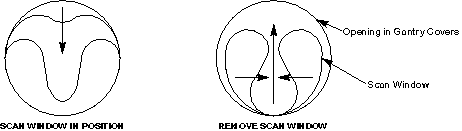
- Grab the window at the top and pull firmly downward.
- Continue to pull until the top of the scan window makes contact with the bottom portion of the scan window.
- Hold the top and bottom portions of the scan window together, grasp
both sides of the scan window, move them together and lightly pull upward,
until you can free the window from between the front and rear covers.
Figure 1. Scan Window Removal
2 Install Scan Window
Procedure
- notice
- Install the front and rear covers.
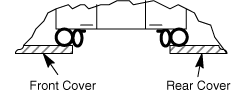
- Deform the scan window, as shown in Figure 2, and nest the scan window at the bottom of the opening between the front and rear covers, (Figure 3) with the rivets in the 6 o’clock installation position. Remember the rivets must be in the 12 o’clock position when the mylar window is fully installed.
- After you complete the initial seating of scan window, let the window slowly unfold, and work both sides of the window into position, starting at the bottom and finishing at the top.
- Make sure you position the window with the rivets at the 12 o’clock
position, and the mylar window slit at either the 3 or 9 o’clock position.
Figure 2. Install Scan Window
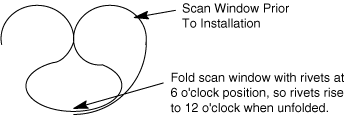
Figure 3. Scan Window Nested Between Front and Rear Cover
- Visual inspect the scan window shall be no wrinkles after installation.
 |
3 Finalization
Procedure
- Perform (10) slices at 10mm aperture. Inspect all images for ring or band artifacts.note: Scans must be run to verify the scan window is not causing any issues.