- Topic ID: id_15460375
- Version: 3.0
- Date: Jun 15, 2020 10:56:23 PM
Gantry and Detector Filter Cleaning
Prerequisites
Overview
This procedure defines the necessary steps to clean the Gantry and Detector plenum filters.
1 Detector Plenum Filter cleaning
Procedure
- Refer to VCT DAS and Detector Fan, Fan Plate Assembly Replacement for instructions on removing the fan plate to access the filter assembly. With the fan plate off, the filter is exposed for cleaning.
- Using the field HEPA vacuum, clean the filter through the opening
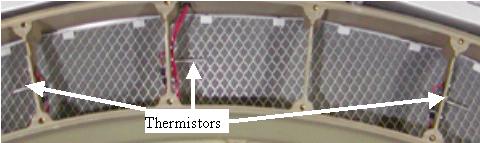
in the plenum behind the fan plate. Be careful around the plenum thermistors.
See Figure 1 showing the thermistors, cabling and grillwork
covering the filter to be cleaned.note:
The grill is there to provide stiffness to the filter assembly and to make sure the EMC mesh on the back of the filter is not damaged during cleaning.
Figure 1. Plenum Filter and Thermistors
- Reinstall the fan plate and connections per the VCT Detector Fan, Fan Plate Assembly Replacement instructions. Perform the fan checks defined in that procedure.
2 Gantry Filter Cleaning
Procedure
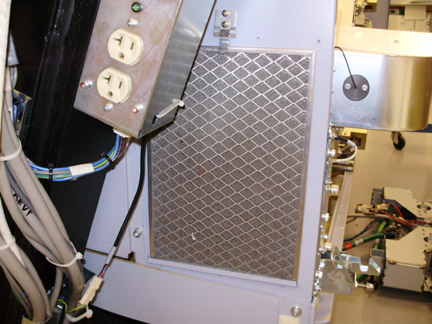
- Initially vacuum the gantry filter in place to avoid shaking
loose dust and debris.
Figure 2. Gantry FIlter on Gantry left
- Remove the gantry filter and vacuum from the front to pull dust and debris out of the filter. (vacuuming from back first may pull dust deeper into filter making it harder to remove)
- Vacuum the back after cleaning the front to remove any dust that penetrated the filter.
3 Finalization
Procedure
- No finalization steps necessary for the detector plenum filter.
- No finalization steps necessary for gantry filter.