- Topic ID: BJ_211028_N01
- Version: 2.0
- Date: May 23, 2022 11:25:34 PM
Open Console (Z8G4) Host Computer Components Replacement
Prerequisites
Overview
This procedure shall be followed when replacing the components in the Z8G4 host computer.
Procedure
- Remove Customer Information:
- Shut down application from the Service Desktop
- In an xterm window, log in as root.
Type: su - and then ENTER
Type the root password: password and the ENTER
- Lanuch the Install utility
Type: reconfig and then ENTER at the prompt
The Operator Console displays the Install Utility Window.
- Select CONFIG and the Operator Console display the CT Software Configuration Screen-System Setting Screen.
- Remove the customer name, replace with GEMS.
- Remove the Service ID, replace with GEMS.
- Under Regenerate Database? select YES.
- Select ACCEPT. Be patient, this takes a few minutes to generate.
- Select YES to reboot. The system will automatically log in as ctuser after the reboot.
- Select OK on the Autostart disabled popup message.
- Open a Shell window.
- Type: ST and then ENTER.
- When the system is at Applications, select IMAGE WORKS.
- Confirm that customer image data is not present.
- Select one of the following methods to Power OFF the Operator Console:
- If Applications are up, click on the Shut Down button and select Shutdown.
The Operator Console monitor will display a 'Power Down' message when it is acceptable to power OFF the Operator Console.
- If Applications are down, open a Unix Shell. Type: halt.
- If Applications are up, click on the Shut Down button and select Shutdown.
- Power OFF the console at the front panel switch, and apply LOTO.
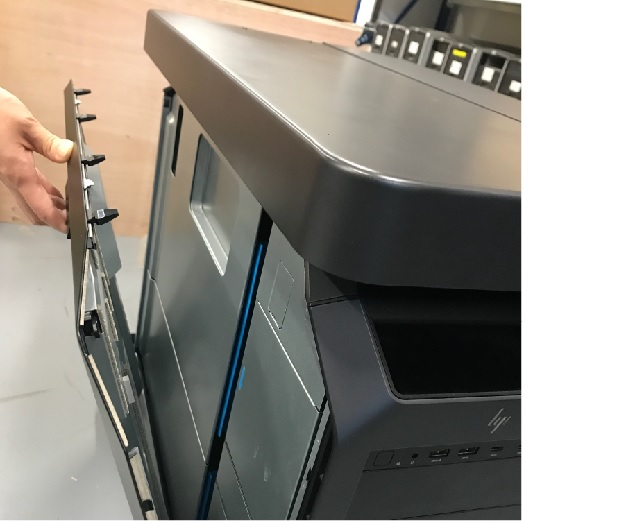
- Pull out the latch to release the host computer left side cover.
Figure 1. Side Access Panel Removal
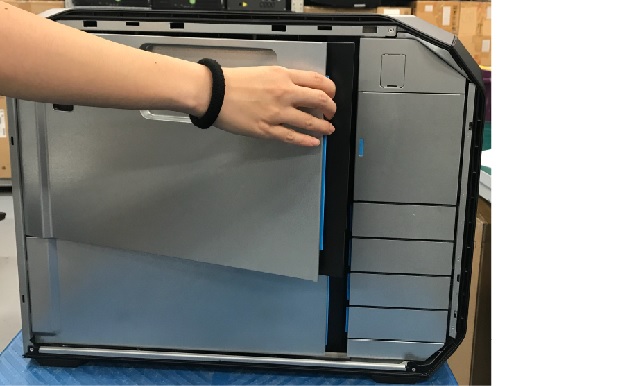
- Open and remove the module small side cover.
Figure 2. Remove module small side cover
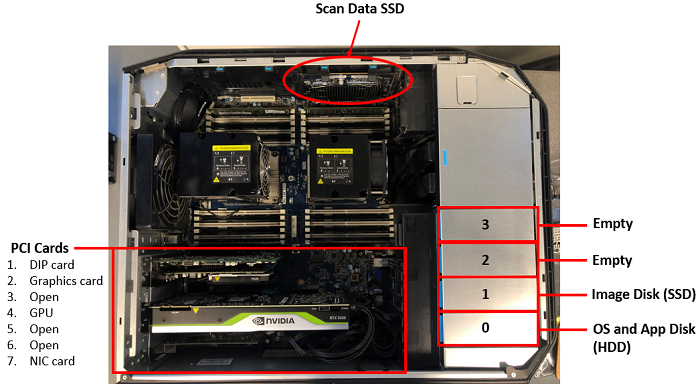
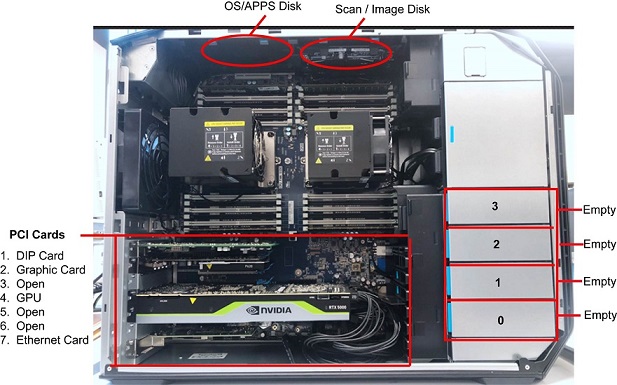
- Locate the Host Computer components by referencing the below figure.
Figure 3. Z8G4 Component Location
(For Z8G4_W06)
(For Z8G4_W10)
- Replace the components of Z8G4 Host Computer. Please refer below procedures.
- (For Z8G4_W06)
- (For Z8G4_W10)
1 Finalization
Procedure
- Reinstall module small side cover.
- Reinstall the host computer left side panel.
- Power ON the console and confirm the host computer does not display POST (Power On Self Test) errors.
- Refer to System Scanning Test to confirm proper operation.