- Topic ID: id_18718067
- Version: 1.1
- Date: Aug 18, 2020 2:29:36 AM
HP Table Theory
1 Table System
1.1 Overview
Patient positioning is done manually through the gantry mounted operator controls. The drives provide horizontal and vertical positioning of the patient. Longitudinal motion of the cradle provides horizontal positioning through the scan plane. During scanning modes, longitudinal position is controlled by the MTCB board. Longitudinal motion can also be controlled with console push buttons used to advance the patient to the next scan position.
The main features of the table system used on this CT system, when compared with tables used on LightSpeed 4.X or previous systems, are as follows:
-
The table functionality is limited to elevation and longitudinal (cradle) patient positioning. (The table no longer controls gantry tilt operation, nor interfaces gantry control push buttons and display and table foot switches.)
-
The cable connections to the table are reduced to the following three:
-
Signal cable
-
Low voltage AC power supply (120 VAC single phase)
-
Ground cable
-
-
Two identical AC servo drives are used for elevation and cradle, respectively.
-
Absolute encoders are used for elevation and cradle, instead of incremental encoders. The absolute encoder has the capability to generate an unique binary 'word' for each encoder shaft position, allowing the encoder to provide positional information instantly upon power-up, unlike incremental encoders.
Therefore, potentiometers are not used on this table system.
-
The table is not included in the Emergency Stop Interlock loop.
1.2 Block Diagram
Figure 1. Table Block Diagram
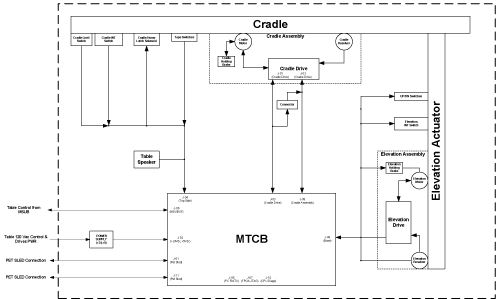
For a larger version of this illustration, click on the pdf icon below:
Figure 2. Table Block Diagram
Table Block Diagram1.3 Cradle Operation
Control of this closed loop drive system is provided by the MTCB board. The board sets velocity, direction, acceleration, and position, and sends the commands to the drive via the serial lines. The drive amplifier is supplied with 120 VAC single phase. The resulting output is supplied through an enable relay to the cradle drive motor. The motor turns a drive roller at the front of the table that the cradle rests on, thus causing the cradle to move.
Direction and speed feedback is supplied by an encoder driven by a cable and spool assembly attached to the cradle mounting hardware. The cradle encoder outputs approximately 54 counts per mm of cradle movement and makes 10 and a half revolutions over the full cradle range. There are no adjustments for this control loop.
On power-up, the MTCB firmware inputs data to the motor controller (cradle drive) to set-up the position reference based off the absolute encoder. Once characterized, the encoder output as read by firmware will read -0- counts at the cradle home position, and 91962 counts at the full extension of 1703mm, using 54.0 counts/mm. Firmware tells the drive the initial location of the cradle on power-up, and after that the drive will keep track of absolute position via the incremental quadrature counts delivered directly from the MTCB board.
Absolute Encoder for Cradle:
The encoder is a multi-turn type with a cable take-up spool.
Output: Bit Parallel, 17 Bit Gray Code
1.3.1 Auto Move Correction
Once a patient landmark has been set, changing the table elevation by using the gantry mounted push buttons will result in the cradle moving in or out so that the position of the cradle in the gantry opening and patient landmark remain unchanged. This auto move correction does not occur if the elevation is changed with the foot switches or if a landmark has not been set.
1.3.2 Cradle Latch Control
Depressing the gantry mounted operator control cradle release switch will cause the cradle to float freely. This allows the operator to pull the cradle and patient back to the foot end latch position, in case of a patient emergency. Depressing the cradle release switch again will cause the drive to engage and enable the cradle to be driven away from the latched position.
1.3.3 Table Sync Generation
Table Sync Generation is used to inform the axial controller that the table has reached the start of scan position for scout scans.
1.4 Elevation Operation
Control of this closed loop drive system is provided by the MTCB board. Interlocks and enables are set by a table/gantry interference matrix and firmware. The drive amplifier is supplied with 120 VAC single phase. The resulting output is supplied through enable and motor select relays to the table elevation drive motor. The control circuit has no adjustments.
Elevation feedback is provided by a 6:1 geared encoder and is converted to elevation information by the MTCB board firmware. On the MTCB board the signal enabling elevation is intercepted and another enable is created so that the board can disable elevation if the interference sensor is in fault or interference is detected.
Absolute Encoder for Elevation:
The encoder is a single-turn type.
Output: Bit Parallel, 13 Bit Gray Code
1.5 Switch Monitoring
1.5.1 Elevation and Cradle Limit Switches
Elevation switches are magnetic reed switches located at the top and bottom of the elevation linear actuator assembly. Cradle limit switches are mechanical switches located at either extreme end of cradle movement. Firmware ensures that these extreme positions are never achieved. The limit positions can be achieved during the characterization process or firmware/hardware failure.
1.5.2 Patient Interference Switches
Tape switches are located at positions where it is possible for patient extremity injury during positioning. If any of these switches are depressed, cradle longitudinal and table elevation drives are disabled and the gantry operator control panel reset light will flash at a fast frequency. Removing the table side covers will activate this circuitry as well. A jumper plug is provided under the side covers, to enable the drive circuits for service purposes. Depressing the gantry operator control reset switch will once again enable these drives.
2 MTCB
2.1 Overview
MTCB stands for Milwaukee Table Control Board.
The MTCB interfaces with the MSUB and TGP boards and re-directs necessary communication to the Cradle Drive and Elevation Drive. The MTCB facilitates the following major functions:
-
Provide RS232 communication interface with Elevation Drive for elevation up an down functionality.
-
Provide RS232 communication interface with Cradle Drive for cradle inward motion and outward motion functionality.
-
Provide interface for the Elevation Interference Detection functionality.
-
Provide interface for the Cradle Home Position Detection functionality.
-
Provide isolated 5Vdc power for CAN Communication with MSUB and TGP boards.
-
Provide Cradle and Elevation control using encoder gray-code inputs to synthesize quadrature output signals for table position and velocity functionality.
-
Provide control of Cradle Enable, Clutch, Cradle Home Latch, Clockwise and Counter Clockwise Inhibits, and Fault Reset.
-
Provide control of Elevation Enable, Clockwise and Counter Clockwise Inhibits, and Fault Reset.
-
Provide control of optional Elevation Brake and Cradle Brake, and Elevation Clutch functionality.
-
Provide a differential signal to the MSUB to synchronize the table with the gantry.
-
Provide Service Switch Control for Elevation Motion (up/down), and Cradle Motion (in/out).
-
Provide Service Switch Control for Cradle Characterization, Elevation Characterization, in either fast or slow driver motion.
-
Provide RS232 communication interface with PET Sled Drive for CT/PET Hybrid table motion inward and outward functionality.
-
Provide interface for the PET Sled Interference Detection functionality.
-
Provide Pet Sled motion control using encoder gray-code inputs to synthesize quadrature encoder output signals.
2.2 Block Diagram
Figure 3. MTCB Block Diagram
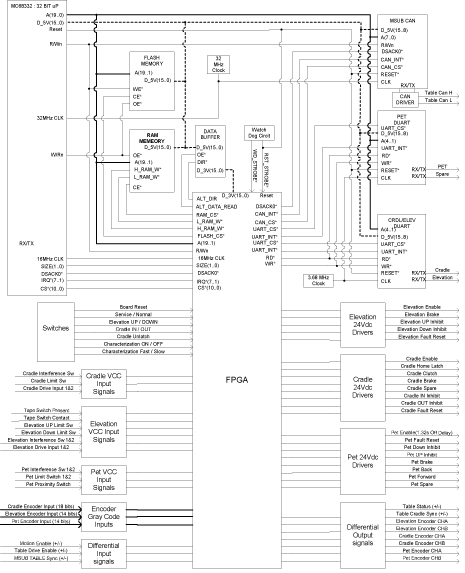
For a larger version of this illustration, click on the pdf icon below:
Figure 4. MTCB Block Diagram
MTCB Block DiagramHardware Description:
Brief descriptions about the main devices on the board are written below:
-
Micro Controller (MC68L332): This incorporates a 32 bit CPU (16MHz), a system integration module (SIM), a time processing unit (TPU), etc.
-
DUART (Dual Universal Asynchronous Receiver/Transmitter
-
Serial Communication Controller CAN: Performs serial communication according to the CAN Protocol.
-
FPGA (Field Programmable Gate Array): This is used for implementing digital functions. It is programmed at power-up from an external serial PROM. The FPGA will implement the following functions:
-
Input Status registers
-
Interrupt matrix
-
Cradle, Elevation, Pet Sled encoder grey code to binary conversion
-
Cradle, Elevation, Pet Sled position / offset position comparison
-
Cradle, Elevation, Pet Sled quadrature output generation
-
Cradle Sync pulse to MSUB
-
Output control registers
-
Watchdog circuitry
-
Board part number and revision number status registers
-
Synthesized Duart Read / Write control signals.
-
Synthesized Ram High and Low memory chip selects.
-
Debounce circuitry for switch inputs
-
Control Status input delay circuitry
-
2.3 MSUB Interface
2.4 Cradle Functions
2.4.1 Cradle Drive Communications
The MTCB contains a UART to perform serial communications (RS232) with the cradle drive.
2.4.2 Input Signals from Cradle
2.4.3 Output Signals to Cradle
2.5 Elevation Functions
2.5.1 Elevation Drive Communications
The MTCB contains a UART to perform serial communications (RS232) with the elevation drive, as with the cradle drive.
2.5.2 Input Signals from Elevation
2.5.3 Output Signals to Elevation
2.6 Emergency Stop Loop
The MTCB is not included in the E-stop Interlock loop. This function is local to the gantry, console, and PDU. The MTCB is effected by the opening of the E-stop Interlock loop. A differential signal is sent to the MTCB from the MSUB indicating that the E-Stop Interlock Loop has been opened. The 120Vac power to the Table will be severed in 1.3 seconds which allows the firmware to stop the cradle and elevation motion. There will be no 120 Vac power to the table until the E-Stop Interlock Loop has been reset.
2.7 Service Functions
2.7.1 Hard Line Enable / Service Mode
This signal provides the same Hard Line Enable function as that from the MSUB. The Hard Line Enable is used to provide for an electrical hard line from the Gantry control push buttons.
This differential signal must be met in order for motion to be available in the table.
2.7.2 Characterization
Table Characterization (cradle or elevation) is a process that must be completed anytime when the following components are replaced:
-
Encoder
-
MTCB Board
Table Characterization is not required when the table is installed.
This process is used to compensate for mechanical variation in the table that would otherwise cause inaccuracy in terms of position or velocity. The process used for the table system sets 2 key parameters.
The first parameter establishes the zero-position of the drive (offset). For the cradle this is at the “home” position (cradle fully retracted), (for elevation this is for the fully down position). It is important to note that in either case, the limit switch has not been activated at the zero position - limit switches are used only to halt motion if the drive mechanism accidentally moves past the mechanical limits. A pin is inserted manually at the cradle home position to accurately place and hold the cradle at the zero reference. The MTCB firmware then reads the cradle location from the encoder.
The second parameter establishes a linear correction (gain) to compensate for inaccuracies across the full range of position, mainly caused by encoder spool inaccuracies (in the case of cradle).
A signal is sent to the processor when S7 is set to the Characterization ON switch position indicating that the MTCB is in characterization mode and is waiting for the cradle and elevation characterization buttons to be pressed.
Characterization/Manual Service Speed:
Characterization / Manual Service Speed can be at either slow or fast motion speed determined by firmware set by SW6.
Cradle Char Input Switch:
This signal informs the processor that cradle characterization position has been met.
Signal is sent to the processor when S9 is pressed. This is a momentary contact switch.
Elevation Char Input Switch:
This signal informs the processor that elevation characterization position has been met.
Signal is sent to the process when S5 is pressed. This is a momentary contact switch.
2.7.3 Cradle Unlatch
The Cradle can be Unlatched or Latched by S10.
When S10 is pressed, a signal is sent to the processor indicating that there is a request to unlatch or latch the cradle. Firmware will then send an output command to unlatch or latch the cradle.
This switch does not work without firmware response to S10. This is a momentary contact switch.
2.7.4 Cradle In/Out Motion Control
Cradle motion can be controlled from S2 when S4 is in Service Mode.
When S2 is switched to IN or OUT position, a signal is sent to the processor indicating that there is a request to move the cradle. If interlock conditions are not violated, firmware will then control the cradle motion through the Cradle UART connection.
This switch does not work without firmware response to S2.
Interference Matrix is not functional in service mode.
2.7.5 Elevation Up/Down Motion Control
Elevation motion can be controlled from SW3 when S4 is in Service Mode.
When S3 is pressed, a signal is sent to the processor indicating that there is a request to elevate the table. If interlock conditions are not violated, firmware will then control the elevation motion through the Elevation UART connection.
This switch does not work without firmware response to S3.
Interference Matrix is not functional in service mode.
2.8 Switches
2.9 Test Points & LEDs
2.10 Fuses
3 Cradle and Elevation Servo Drives
3.1 Description
The table system uses two servo drives. These servo drives are located inside the table. The hardware and functionality of each drive is the same, except that there is a different characterization file for each function loaded by the firmware on the MTCB. Communication to the servo drives is carried out via RS232.
The servo drive accepts input from the MTCB through RS232 and relay that information to the servo motor to drive the motor. The MTCB also supplies an enable line to the drive for motor movement. The servo must send a signal via RS232 back to the MTCB that the requested motor movement has been accomplished. The servo drive must also be able to read quadrature counts from the MTCB to close of position loop.
3.2 LEDs
The following LEDs are provided:
-
Power: lit in the power-on state
-
Fault: lit in an error condition; The error information is sent via the RS232 lines.