- Topic ID: id_18718055
- Version: 2.0
- Date: May 26, 2022 5:25:06 AM
All-In-One Console Theory
This module contains the following subsections:
-
Overview - Overview (All-In-One Console)
-
Host Computer - Host computer
-
Image Generation (IG) Computer - Image Generation (IG) Computer
-
Reconstruction Acceleration Card (RAC) - Reconstruction Acceleration Card (RAC)
-
Power - Power
-
Intercom Component - Intercom Component
-
SCSI Tower - SCSI Tower
-
Cooling Package - Cooling Package
-
Service and Diagnostics - Service and Diagnostics
-
Console Block Diagrams - Console Block Diagrams
1 Overview
The All-In-One Console consists of the following components.
-
Host Computer - incorporates the Scan Data Disks and CDIP board from DARC Node in the previous console GRE/GOC4. There is no DRAC node presence in AIO (All-In-One) console.
-
Image Generator (IG) - Is the same as the previous console version GRE/GOC4. IG is an option for AIO (All-In-One) console and only applicable when using Fluoro Option.
-
Intercom - Is the same as previous console version GRE/GOC4.
-
Cooling Package, including:
-
Fans
-
Front and Rear Covers with Foam Insulation
-
Air Filter
-
For AIO console, Host computer receives raw data from the Data Acquisition System (DAS) through an on-board Data Interface processor (CDIP) card, and stores that data in the Scan Data Disks located in the Host computer. The raw data is then delivered from the scan data disks in the Host PC to the IG processes in Host PC or in IG node. The IG processes then create images (If IG node is installed, IG computer creates images using on-board processors and Recon Accelerator Cards (RAC)). The images generated are saved in image disk in host computer.
Though each IG node will have a floppy boot disk, the host computer should be capable of booting IG node via Gigabit Ethernet, using Serial Over LAN (SOLAN) functionality.
The host computer for the All-In-One console will be an off-the-shelf, Linux-based system, which meets EMC requirements per CISPR 11.
Key performance specification of the AIO console are:
-
Recon times: 6 fps @ 2D BP
-
Latency: < 5.0 seconds
-
Image Matrix: < 512 x 512 pixels
-
2D BP: hardware and software support
-
3D BP: not yet supported
2 Host Computer
Host Computer in AIO console not only provides the same functions as previous console GOC4, but also provides data acquisition and image reconstruction functions.
Host Computer controls all the AIO console functions and data flow, including actual image generation. Software in Host computer sends the reconstruction request, recognize the recon mode, timing, parameters, and data, and be able to generate the image set. The raw data is first restored from the disks. The Host Computer then creates an image set and requests image generation to the IG node (If presence) or IG process in Host Computer. While most of the software components (e.g. Recon_Control, Data_Restore, Image_Buffer, and Data_Acq) reside on Host Computer, the components related to image generation are calculated on the IG node. If IG node is not presence, the components related to image generation also reside on Host Computer.
Main data flow of the Host Computer is described as follows:
-
Receive raw data from the Gantry
-
Store the raw data to the scan data disks
-
Restore the raw data from the scan data disks and transfer to IG node over GB Ethernet. If IG node is not presence, the raw data will be transferred to buffer memory in Host Computer.
-
Take multi-image streams from the IG node and save them on image disk in host computer.
-
If IG is not presence, images stream will be got from Image generation process ran on Host computer, and be saved on image disk in Host Computer.
The Host Computer is comprised of the following:
-
HP computer: a computer using a high-performance PC workstation
-
System disk: the OS and Applications software are stored on this disk
-
Image disk: Images are stored on this disk
-
Scan data disks: the raw data are stored on two scan data disks.
-
CDIP card: the DAS Interface Processor card
-
Gigabit Ethernet (GbE) cards
-
DVD-ROM drive: will be used for software installation and stand-alone use
-
Floppy drive: a 3½” floppy drive will be used for BIOS flash, if necessary
-
SCSI card: used to connect SCSI tower
-
Graphics board: connect to two LCD monitors
2.1 Motherboard
The Host Computer will take advantage of a standard, off-the-shelf motherboard, using dual microprocessors to increase processing density. The Host Computer will use very high performance general-purpose processors, memory, and a server motherboard with GB Ethernet and SAS port(s), and power supply.
-
Dual Processors: Intel® Xeon™ Quad Core processors or successor
-
Memory: Min. 8GB FBD DDR2-667 REG ECC DIMM
-
Onboard SAS Devices: four (4) SAS ports reside on mother board
-
Seven (7) PCI/PCI-X/PCI-E expansion slots.
-
SLOT 1 PCI: Dual ultra SCSI card
-
SLOT 2 PCI-E: graphics card
-
SLOT 3 PCI-E: Open
-
SLOT 4 PCI-E: Open
-
SLOT 5 PCI-X: CDIP card
-
SLOT 6 PCI-X: Dual Port Gigabit Ethernet Card
-
SLOT 7 PCI-X: Dual Port Gigabit Ethernet Card
-
2.2 Chassis
The chassis is a standard EIA 19" x 4U rack-mount with a max. depth of 20". The chassis have a cooling system capable of sufficiently dissipating heat created by the motherboard's dual processors.
Power Supply: ATX or SSI EEB compliant; input 100-120Vac / 200-240Vac, @ 50-60Hz, auto-detecting
2.3 Disk Drives
There are four (4) SAS hard disk drives (146GB) in Host computer. Below are the definition of these four hard disk drives:
-
SAS0: System disk
-
SAS1: Image disk
-
SAS2: Scan data disk 1
-
SAS3: Scan data disk 2
Below are key performance specifications of the hard disk drives:
-
Minimum rotational rate of 15,000 RPM
-
SAS interface (3 Gigabits/second burst rate)
-
Formatted capacity of 146 Gigabytes
-
Form Factor: 3.5” half height form factor
The Scan Data Disks are connected to the mother board via internal SAS bus cable. To increase the disk read/write speeds software RAID0 (striping) is employed.
2.4 CDIP Card
This PCI CDIP card supports almost the same functionality as the current DIP in that it converts the optical signal received from the Gantry into electrical raw data and writes that data to one of the double buffers on the card. When the received data count reaches a predetermined value it will switch over to the other buffer. The Host Computer then receives this data via the PCI bus. This card supports 64bit, 66MHz, PCI bus interface with an FPGA, and should be able to support 833MB/sec data rate optical fiber interface.
2.5 Gigabit Ethernet Card
Optional IG node is to be connected to the Host computer via Gigabit Ethernet (GbE) card connected to one of the PCI-X slots.
Dual Gigabit Ethernet ports
-
10Base-T, 100Base-TX, 1000Base-TX IEEE802.3ab compatible
-
64bit, 66MHz (or higher) PCI-X interface
-
Low profile form factor
Gigabit Ethernet card ports definition is described below:
2.6 DVD-ROM Drive
The DVD-ROM drive is used for software installation, system diagnostics, and to support stand-alone operation of the Host computer.
2.7 Floppy Drive
This 3½” floppy disk drive will be used for BIOS upgrades or for a boot disk, if necessary.
3 Image Generation (IG) Computer
3.1 Overview
The Image Generator (IG) component mounts an FPGA accelerator card (RAC card) on a PCI-X slot. The IG node works under the Host computer's supervision as a very high performance image generation calculator. When an IG node receives an image generation request from the Host computer it will perform image generation processes. (i.e. preprocess, filtered back projection and post process, etc.) When an image set is calculated, the IG node notifies the Host computer and transfers the set of pixel image data to the Host computer via Gigabit Ethernet. IG node is connected to the Host computer directly, without a switching Hub.
The IG node consists of the following:
-
IG computer: computer using a high-performance PC server
-
RAC Card: Recon Accelerator Card plugged into a PCI-X slot in the IG computer
-
Floppy drive: a 3½” floppy drive will be used for BIOS flash, if necessary
3.2 Motherboard
The IG motherboard shall meet the following requirements:
-
Support Dual Intel® Xeon™ Socket604 processors (2.8GHz minimum)
-
Onboard regulation of processor voltages
-
Intel® E750x chipset
-
533Mhz Front Side Bus (FSB)
-
Minimum of one (1) 10/100/1000 Mb onboard ethernet port
-
2.0GB DDR-266 SDRAM® memory using minimum two (2) 184-pin DIMM sockets
-
Support Serial Over LAN (SOLAN)
-
One (1) PCI-X expansion slot (100Mhz min.) accommodating a riser card
-
BIOS configuration shall be in accordance with details outlined in Appendix A of direction 2362872PSP
3.3 PCI Expansion
The IG shall include at least one (1) PCI-X expansion slot capable of accommodating a full-height “short” card.
This expansion slot shall contain a Recon Accelerator Card (GE Healthcare part no. 2316826).
3.4 Floppy Disk Drive
The IG shall contain one (1) internal 3.5”, half-height, 1.44MB floppy diskette drive.
3.5 Ethernet Ports
The IG does not require Ethernet ports in addition to the board-resident port.
3.6 Physical Size
-
Chassis type: Rack-mountable
-
Mounting orientation: Horizontal
-
Maximum chassis height: 1U (44.5mm/1.75”)
-
Maximum chassis width: 19” Rack standard
-
Maximum chassis depth: 508mm (20”)
-
Maximum weight: 10 Kg (22 lbs)
-
Internal signal and power harness drops must be sufficient to support maximum configuration above
-
Handles shall be mounted at each side of the front of the chassis for ease of removal from a rack. Handles shall protrude no more than 20mm (3/4”) from the chassis front panel.
3.7 External Switches and Indicators
The IG shall include external switches and indicators on the chassis as follows:
-
A system pushbutton POWER ON/OFF switch which toggles system power ON or OFF when pressed or held.
-
A pushbutton system RESET switch accessible on the front of the chassis that re-initializes all internal hardware without cycling power to the IG (hard reset/soft boot).
-
LED indicators shall be accessible and visible on the front of the chassis as follows:
-
System power is ON - steady GREEN - labeled “I/O”
-
System error - flashing or steady RED - labeled “FLT”
-
LAN Activity - flashing GREEN - labeled “LAN”
-
4 Reconstruction Acceleration Card (RAC)
This “low-profile” PCI card accelerates the two-dimensional (2D) back-projection process of the GOC4 and is plugged into a 64bit, 66MHz (533MB/sec) PCI-X slot on the IG node.
This parallel beam back-projector provides the GOC4 the ability to off-load the back-projection application from general-purpose processors to fully programmable hardware. This option dramatically increases the reconstruction performance per cost ratio.
Following are the high-level CTQs for the RAC card:
-
Perform 2D parallel beam back-projection at >6fps
-
PCI-X low-profile compatible
-
Communicate with IG computer through a go => complete protocol
-
Support PCI and Mailbox interrupts
-
Reconstruct any image matrix size up to 524,288 32bit pixels
-
In-system programmable FPGA design via software download
The major elements of the RAC card consist of:
-
Field Programmable Gate Array (FPGA)
-
QDR™ SRAM - creates two blocks of memory
-
FLASH Memory - contains the FPGA's configuration code
5 Power
The Host computer and optional IG node are each powered by an AC switching power supply internal to each chassis. Each node receives its AC power from a 120Vac single-phase outlet box internal to the console chassis.
A redundant power supply and/or UPS option does not need to be supported by each node. The NGPDU will provide 120Vac to the operator's console. The switching power supply internal to each node is required to allow ±5% stability.
These AC switching power supply in each node shall be SSI EPS12V, SSI EPS1U, SSI EPS2U, or ATX compliant.
-
SSI EPS12V: 24-pin for motherboard, 8-pin +12V for processor, 4-pin for peripherals
-
SSI EPS1U: 62-pin edge finger for 1U chassis server
-
SSI EPS2U: 24-pin for motherboard, 8-pin +12V for processor, 4-pin for peripherals
-
ATX: standard PC power supply, 20-pin for motherboard, 4-pin for peripherals
The table below lists the node, power supply wattage, input port (max current), and output port.
6 Intercom Component
The intercom block has an audio amplifier circuit, enabling communication between the console operator and the patient on the table. This block also has sound source switching functionality.
The sound sources are:
-
Console microphone on the SCIM (Operator's voice)
-
Gantry microphone output (Patient's voice)
-
Auto-voice L and R (output from the host computer)
These sound sources are multiplexed by the TALK button on the SCIM and by the Auto-voice output itself. The selected output signal goes to the following devices, based on prioritized logic.
-
Table speaker
-
Console speaker on the SCIM
-
Auto-voice recording input on the host computer
Also refer to GOC4 Intercom Theory and Adjustments.
7 SCSI Tower
Two Bay External SCSI tower that is used on the Global Recon Engine Console. The tower will contain a MOD read/write device and a DVD-RAM drive.
Figure 1. SCSI Tower (Exploded View)
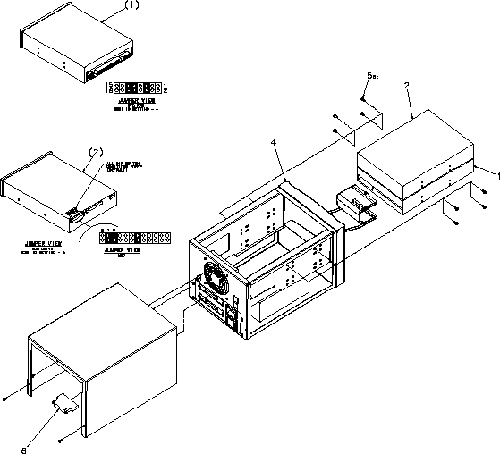
Click on the PDF icon below, to view the full version of the illustration.
Figure 2. SCSI Tower (Exploded View)
190277.pdf8 Cooling Package
The cooling package consists of three (3) components:
-
Fan Assembly
-
Front and Rear Covers, with Foam, for sound reduction and air flow control
-
Air Filter
The Fan Assembly has perpendicular mounted larger fans than the GOC3 consoles. The Individual Fans are FRUs.
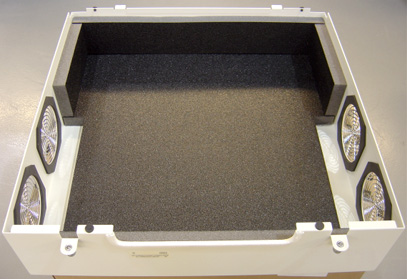
The Front and Rear covers are equipped with Insulating Foam, to both deaden noise and direct air flow for proper cooling.
The Air Filter is designed to capture room contaminates. It needs to be periodically cleaned (during a regular PM cycle).
The following diagrams illustrate the Cooling Package Components.
Figure 3. Console Cooling Fans
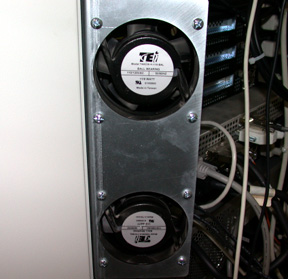
Figure 4. Console Rear Cover, with Foam
9 Service and Diagnostics
The AIO console supports two types of diagnostic, power-on test and offline test. The power-on test is a subset of offline test. This test sweeps devices condition and checks the motherboard and some devices BIST results at system power-on after OS booted. The offline test checks each device condition, interface, and environment more strictly.
AIO console supports some kind of diagnostic tools.
-
Motherboard diagnostics, including memory test
-
DIP diagnostic
-
RAC BIST and/or diagnostic
-
Scan Data Disk diagnostic
-
Network / connectivity test
Assemblies are assigned as FRUs based on the likelihood of need for replacement and fixed-right- first-time (FRFT). The following is a breakdown of AIO Console FRUs:
-
Host Computer
-
CDIP Board
-
Hard disk drive
-
IG (optional)
-
intercom
-
SCSI Tower
10 Console Block Diagrams
Data Flow Dictionary
-
Gantry -> DIP: Serial data receive from a fiber optic interface
-
DIP -> Disk: Scan Data Store
-
Disk -> Recon Control: Offset Data
-
Disk -> Data Restore: View Data
-
Recon Control -> IG process on host (or optional IG computer): Calibration Data, offset vector, tables, parameters
-
Data Restore -> IG process on host (or optional IG computer): If IG computer exists, view Data transfer from the Host to IG over gigabit Ethernet. Otherwise, data transfer between software processes within host computer.
-
IG process -> Image Buffer Create: Pixel image data and small header are transferred from the IG process in host or in optional IG computer to image buffer create process in Host.
-
Image Create -> Image DB: DICOM image data and are transferred from the image buffer create process to image DB in host.
Figure 5. AIO console Detail Hardware Level Data Flow
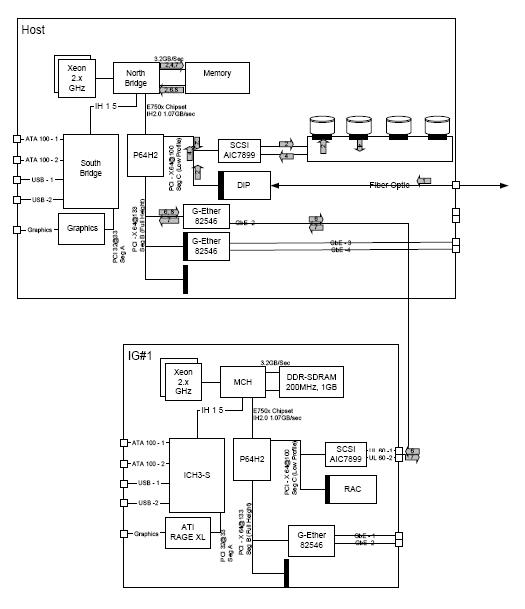
Click on the PDF icon below, for a PDF version of the above illustration.
Figure 6. AIO console Detail Hardware Level Data Flow
2078979.pdfFigure 7. AIO console Interconnect Diagram
3303627.pdf