
- SIGNA™ Hero 3.0T Service Methods
- 5852800-8EN Revision 1.0
- 00000018WIA30D5FE20GYZ
- id_131060033.0
- Aug 29, 2019 1:34:12 AM
Restore Start Values for Calibration
Prerequisites
| Required persons | Preliminary requirements | Procedure | Finalization |
|---|---|---|---|
| 1 | Not Applicable | 25 minutes | Not Applicable |
| Item | Quantity | Effectivity | Part number | Manufacturer |
|---|---|---|---|---|
| Pre-cal data DVD shipped with the system | 1 | - | - | - |
| SSA Key | 1 | - | - | - |
| Condition | Reference | Effectivity |
|---|---|---|
|
Insert SSA Key into USB port on host computer. | - | - |
About this task
This document provides instructions for using the Guided Install interface to restore start values before starting calibration in installation.
Procedure
- Click Restore Start Values for Calibration.
Figure 1. Save/Restore Tool 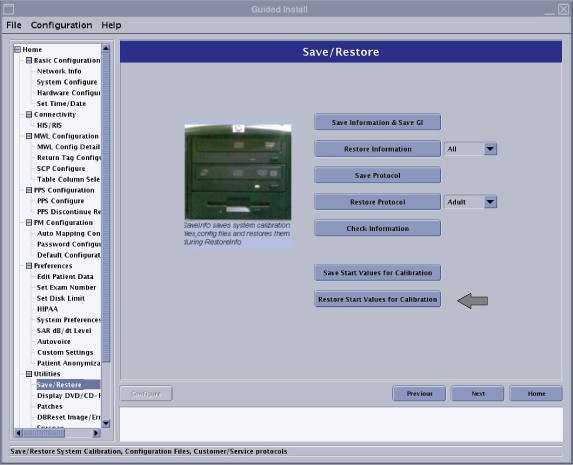 Note:
Note:The [Save Start Values for Calibration] button does not work with SSA Key because this function is prepared for Manufacturing.
Finalization
No finalization steps.