Installs the upper cover onto the front left-hand corner of the magnet.
Prerequisites
Personnel requirements
Required persons
Preliminary requirements
Procedure
Finalization
2
-
15 minutes
-
Tools and test equipment
Item
Quantity
Part number
Manufacturer
Nonmagnetic Titanium Service Tool Kit, Small Set
1
5113258
-
Required conditions
Magnet front cover is installed.
Procedure
Install the left-hand upper front cover onto the magnet. Make sure the tabs of the cover are inserted into the slots in the magnet front cover.
Slide the cover towards the right-hand side of the magnet so that the tabs fully engage the slots.
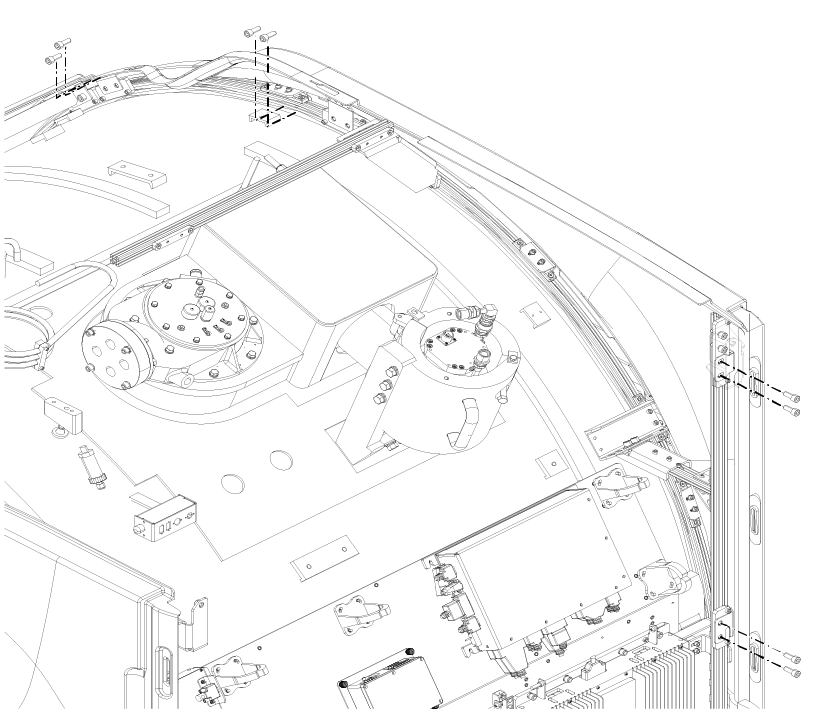
Install eightM10 x 25 Socket Head Cap Screws securing the cover to the magnet.
Figure 1. Left-hand upper front cover screws
Note: Install the screws securing to the round bracket on top of the magnet before the screws securing to the vertical bracket on the left hand side.
Note: If required, it is permissible to move the screw plates on the round bracket to install the screws. Do not move the screw plates on the vertical bracket.

 Note: Install the screws securing to the round bracket on top of the magnet before the screws securing to the vertical bracket on the left hand side.Note: If required, it is permissible to move the screw plates on the round bracket to install the screws. Do not move the screw plates on the vertical bracket.