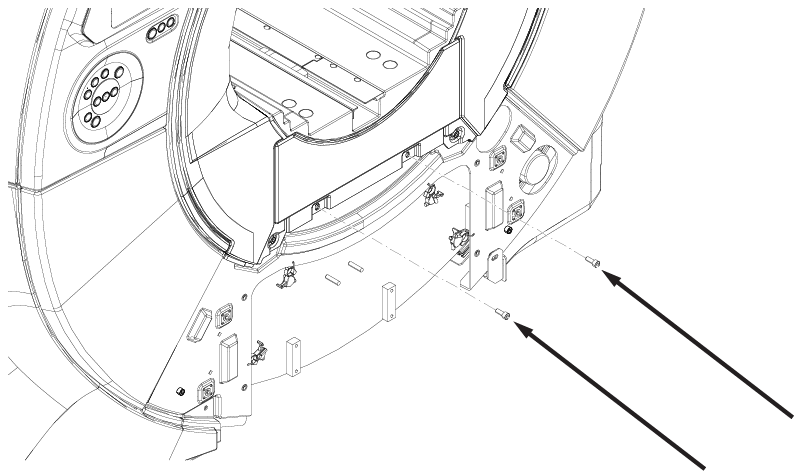
Installs the front bridge cover onto the front endbell. This task can be performed with the endbell installed on the magnet or not.
Prerequisites
| Personnel requirements |
|---|
| Required persons | Preliminary requirements | Procedure | Finalization |
|---|
| 1 | - | 5 minutes | - |
| Tools and test equipment |
|---|
| Item | Quantity | Part number | Manufacturer |
|---|
| Nonmagnetic Titanium Service Tool Kit, Small Set | 1 | 5113258 | - |
Procedure
- Align the tabs on the back of the bridge cover with the tracks on the front endbell.
Figure 1. Bridge cover alignment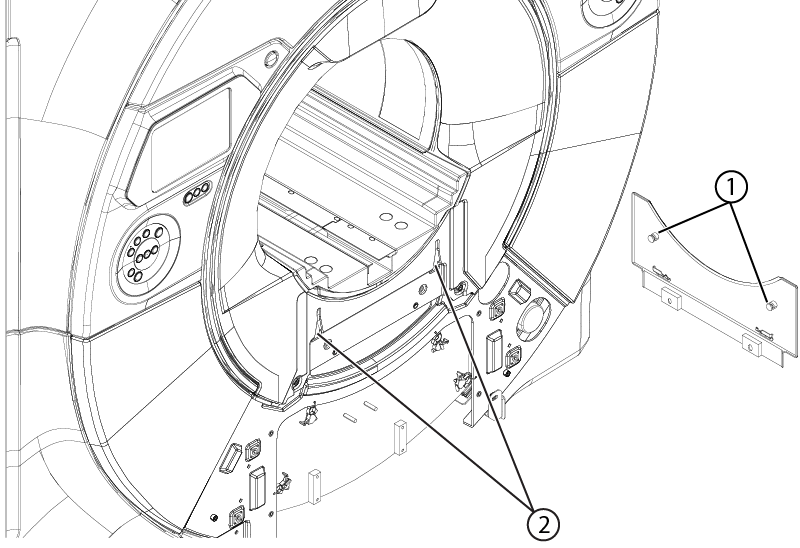
- Slide the bridge cover upward engaging the tabs into the tracks.
- Install the two screws securing the bridge cover to the front endbell.
Figure 2. Bridge cover screws