Load the operator manuals onto the host computer so customers can have access to the manuals any time they are using the system.
Prerequisites
Personnel Requirements
Required persons
Preliminary requirements
Procedure
Finalization
1
-
10 minutes
-
Tools and test equipment
Item
Quantity
Part number
Manufacturer
DVD Media for Operator Manual
1
-
-
About this task
All operator manuals are distributed electronically. These instructions describe how to load the operator manuals onto the system’s host computer so customers can have access to the manuals any time they are using the system.
Procedure
Select the DVD that contains the language for the documentation that is to be installed on the system.
The Operator Manual DVD is available in multiple languages. Each DVD label has the list of languages available.
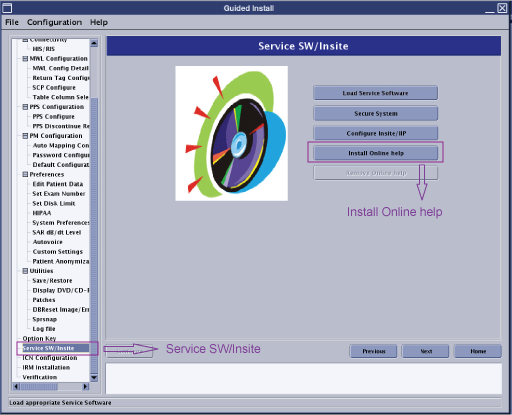
Select Service SW/Insite from the Guided Install content window.
Figure 1. Guided Install Service SW/Insite
Click Install Online Help.
When prompted to insert the media containing online documentation, insert the DVD containing the selected language (DVD Media for Operator Manual) into the host computer's DVD drive and then click OK.
Note: The DVD Media for Operator Manual is available in multiple languages. Make sure that the selected DVD contains the language to be installed at the site.
Result
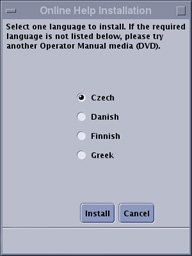
An Online Help Installation dialog box appears.
Select the language that is to be used for the online help and click Install.
Figure 2. Select language for online help
If the language you want is not on the menu, try another operator manual DVD.
Result
After the installation is complete, a message appears indicating that the installation was successful.
Remove the DVD from the drive.
Reboot the system and log on to applications.
To make sure the online help opens, click the book icon on the lower right corner of the monitor and view the documents.

 If the language you want is not on the menu, try another operator manual DVD.