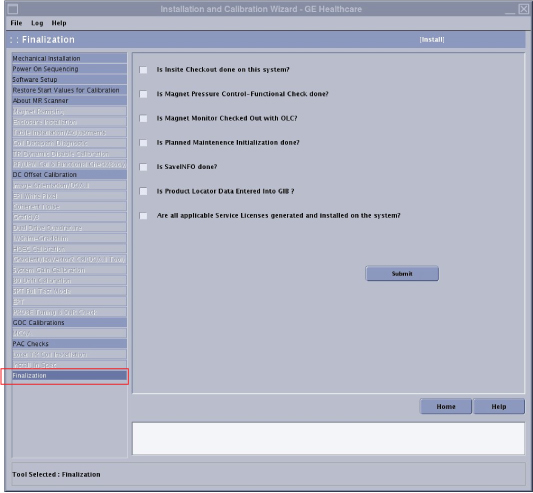
Complete ICW finalization after doing the calibrations in the Installation portion of the ICW. During ICW finalization, there are several tasks that must be completed and checked off:
Check out Magnet Monitor
Do a functional check of magnet pressure control
Initialize planned maintenance
Do a SaveInfo
Enter product locator information in Global Installed Base (GIB)
Procedure
Insert the service key.
Launch the Service Browser (Common Service Desktop).
On the Calibration tab, select Install and Calibration Wizard > Click here to start this tool.
Figure 1. Finalization
Note: The finalization step is selectable only if all of the required calibrations have been completed.
Call the On Line Center to perform checkout of the Magnet Monitor. Be prepared to provide the cryogen ID. The customer provides the cryogen ID, usually at the same time as they provide the System ID. When this is complete, check the box next to Is Magnet Monitor Checked out with OLC?
Check the pressure reading on the Magnet Monitor. The pressure reading should be between 3.9 psi and 4.1 psi. When this is complete, check the box next to Is Magnet Pressure Control Functional Check done?
Initialize Planned Maintenance.
. When this is complete, check the box next to Is Planned Maintenance Initialization done?
For a full list of all the components that should have ICD cards with the installation/upgrade being performed, refer to HDv Items to be entered in GIB.
Enter product locator information into GIB. Collect all product locator cards from the equipment, then either:
If not able to access the GE Intranet, complete the information on the cards and send via regular mail.
Scroll down and enter the customer's system ID and country.
Click Submit.
Click New Entries:
For model: Enter the GE part number (example: 2357500).
For serial: Enter the system cabinet serial number (example: 00000259976MR9).
For Inst./Deinst Date (YYYY-MM-DD): Enter the system installation date shown at the top of the page.
For Add (A): Enter A.
Click Submit.
When this is complete, check the box next to Is Product Locator Data entered into GIB?
For items that the new components replace, remove the old items’ association from the system. Locate the items in the list of items associated with the system on GIB, and type D for Delete and press Enter.
Click Submit.
Finalization
Dispatch your hours for the installation.
If there are remaining steps in the ICW, return to the ICW procedure for information regarding how to advance to the next calibration and for links to other calibration procedures.
If all the steps of the ICW are complete and have passed, close both the wizard and the Common Service Desktop. The next time the ICW is accessed from the Common Service Desktop Calibration tab, the wizard will be in Maintenance mode.

 Note: The finalization step is selectable only if all of the required calibrations have been completed.