Changing the BIOS password - admin password unknown - HP Z420
Change the BIOS password if the admin password is unknown.
About this task
Important: Disconnect the power cord from the computer and allow the internal components to cool before doing these steps.
CAUTION
Risk of component damage
Static electricity can damage components.
Before beginning these procedures, be sure that you are discharged of static electricity by briefly touching a grounded metal object.
Notice
Potential component damage
Electrostatic discharge (ESD) can cause permanent damage to electronic components.
Observe the following ESD precautions:
Work on a static-free mat.
Wear a static strap to make sure that any accumulated electrostatic charge is discharged from your body to the ground.
Create a common ground for the equipment being worked on by connecting the static-free mat, static strap, and peripheral units to that piece of equipment.
Procedure
Shut down the operating system, power off the workstation and external devices, and disconnect the workstation power cord.
(Optional) Disconnect the keyboard, monitor, and other external devices that are connected to the workstation.
Remove the access panel.
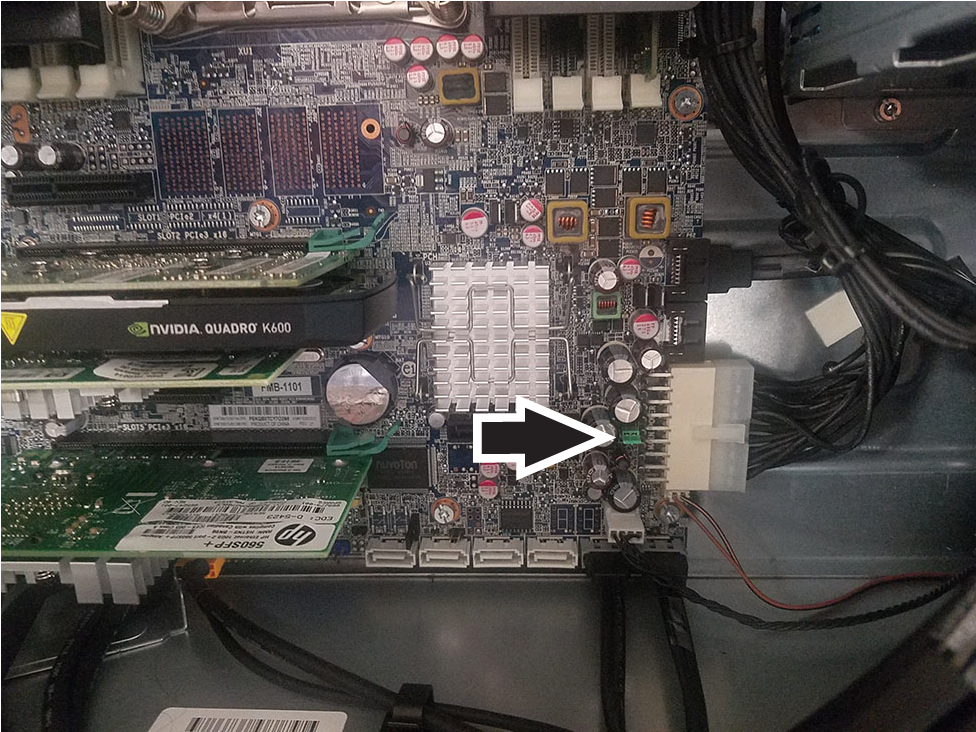
Locate the password header and jumper. The password header is E49.
Figure 1. Jumper location
Make sure the power cord is disconnected from the power outlet.
Remove the jumper from pins 1 and 2.
Note: The password jumper is colored so it can be easily identified.
Reconnect all components and the power to the workstation.
Restart the workstation to the point where there is video.
Shut down the workstation and reinstall the jumper. This will clear the passwords.