- SIGNA™ Hero 3.0T Service Methods
- 5852800-8EN Revision 1.0
- 00000018WHA301872GYZ
- id_20016314.13
- Dec 9, 2021 12:15:33 PM
Doing the local TR coil Stability test
This tool measures and shows the magnitude drift, phase offset, and echo shift using Fast Spin Echo and Gradient Resolved Echo sequences for either the body coil or local coils. Local TR coil scans are disabled until this task is completed.
Prerequisites
| Personnel Requirements | |||
|---|---|---|---|
| Required Persons | Preliminary requirements | Procedure | Finalization |
| 1 | - | 20 minutes | - |
| Tools and test equipment | |||
|---|---|---|---|
| Item | Quantity | Part number | Manufacturer |
| Local TR Coil | As required | - | - |
| Phantom used for MCQA | As required | - | - |
| Required conditions |
|---|
| Cancel all previous exams. Click End Exam. |
| Remove any patient positioning devices, such as patient restraints or other attached devices. |
| Use the MCQA phantom setup procedure with respect to the local TR coil being tested. |
| Safety |
|---|
|
Before working in any GE Healthcare MR suite or performing any GE Healthcare service procedure, you must:
If you have any safety concerns at any time, do not begin work or immediately stop work and move to a safe location. Immediately contact your supervisor or site safety officer for instructions on how to proceed. |
About this task
The system will not permit scans with local TR coils until the local Tx stability test (FSE and GRE stability) passes for at least one local TR coil. If the customer has two or more local TR coils, it is only necessary to test one.
If you try to scan without passing this test, it will not be possible to use local TR coils to scan.
Procedure
- Set up the phantom in the local TR coil, landmark, and advance to scan per MCQA phantom setup procedure. See
Coil information for the MCQA phantom setup.Note: (For Software version 27.x and prior) If the 16-channel TR wrist hand coil is used for this test, the landmark location is different from the MCQA phantom setup procedure in 16-channel TR Wrist Hand Coil manual. See the figure below for the landmark location.
Figure 1. Landmark location for 16-channel TR wrist hand coil 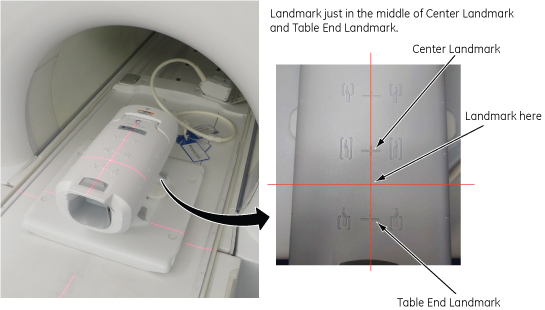
- Click Start.
Figure 2. Stability tool interface 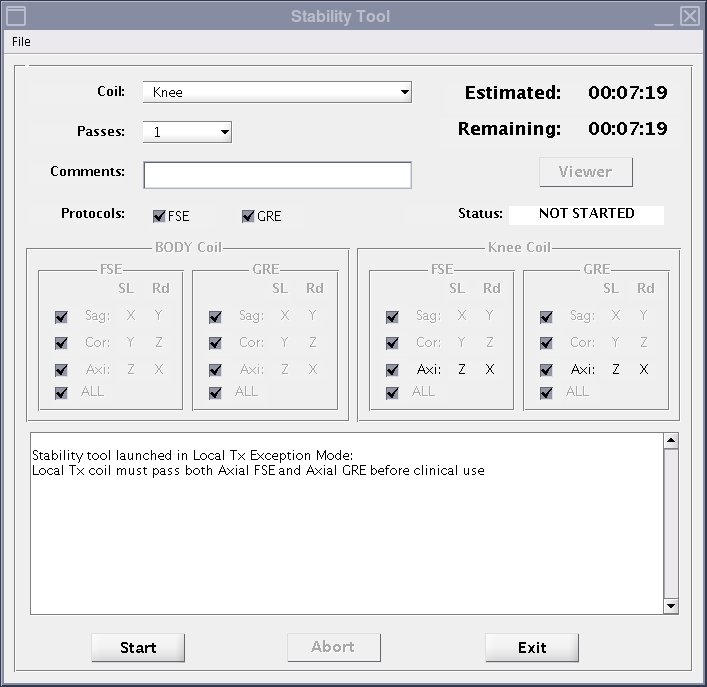
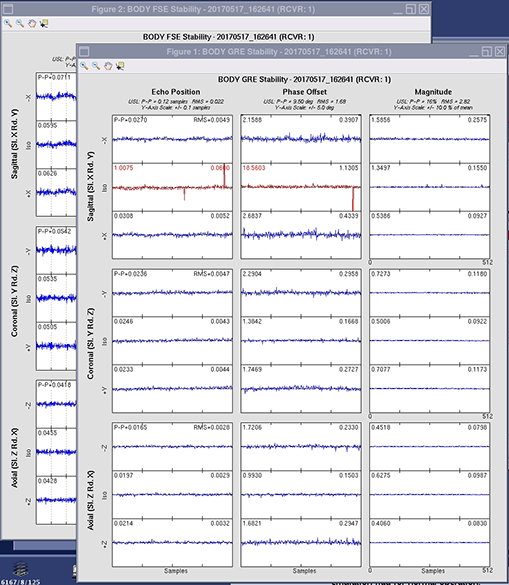
- The test results and plots will show automatically after the test is completed.
- After you close the plots, they are no longer available.
Figure 3. Stability tool output plot example