- SIGNA™ Hero 3.0T Service Methods
- 5852800-8EN Revision 1.0
- 00000018WIA30801750GYZ
- id_20254032.1
- Jul 13, 2021 4:05:25 PM
Configuring the MR system to receive/retrieve images in secure mode using local server settings
Configure the MR system to receive/retrieve images in secure mode using local server settings.
Prerequisites
| Personnel requirements | |||
|---|---|---|---|
| Required persons | Preliminary requirements | Procedure | Finalization |
| 1 | - | 10 minutes | - |
| Required conditions |
|---|
| Make sure all certificates are installed and set up per workflow MR Scanner setup as secure server in Importing and exporting TLS certificates. |
About this task
This part of the user interface is only visible when the following script is executed and the system is rebooted:
python /export/home/sdc/nuevo/scripts/util/displaytlsserverconfig.py --displayTLSServerUI=1
Procedure
- Click the Image Management icon in the upper left corner of the MR OS window.
Figure 1. Image Management network configuration 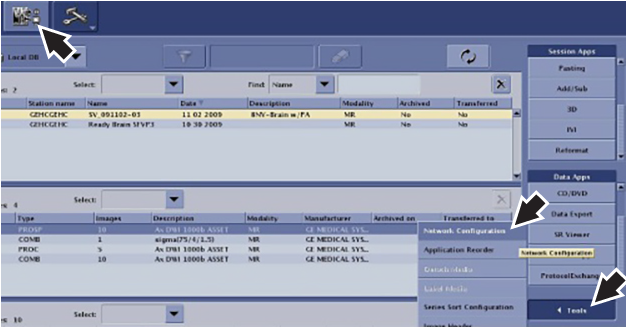
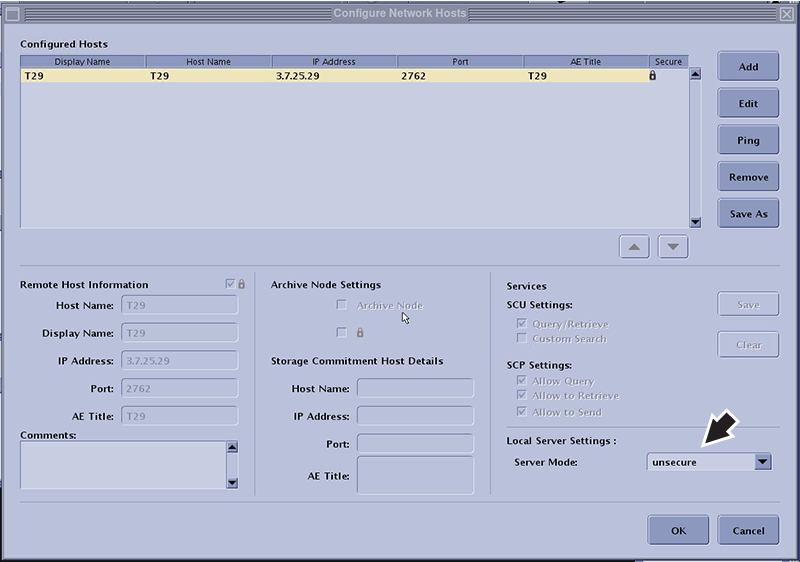
- On the Configure Network Hosts window in the Local Server Settings area, select one of the following server modes:
Option Description Secure If all networked nodes will send images to the MR System through DICOM over TLS only. Unsecure and secure If some networked nodes will send images through DICOM over TLS and others will send images through DICOM over TCP/IP. Unsecure (Default) The MR System will only accept images through DICOM over TCP/IP. Figure 2. Local server settings