
- SIGNA™ Hero 3.0T Service Methods
- 5852800-8EN Revision 1.0
- 00000018WHA308B62GYZ
- id_200143011.6
- Aug 17, 2021 1:16:01 PM
Aligning the laser light
Adjusting the laser light to restore correct alignment.
Prerequisites
| Personnel requirements | |||
|---|---|---|---|
| Required persons | Preliminary requirements | Procedure | Finalization |
| 1 | - | 5 minutes | - |
| Tools and test equipment | |||
|---|---|---|---|
| Item | Quantity | Part number | Manufacturer |
| Nonmagnetic Titanium Service Tool Kit, Small Set | 1 | 5113258 | - |
Procedure
- Remove the two snap-in trim ring side sections.
Figure 1. Trim Ring Side Sections 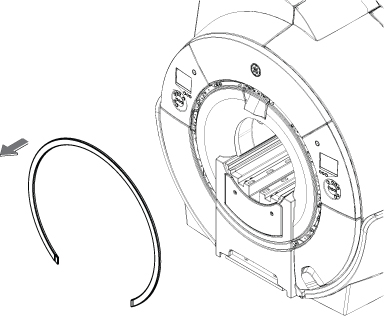
- Find the laser light cover, located the inside front endbell, at the top.
Figure 2. Laser light cover with two captive screws 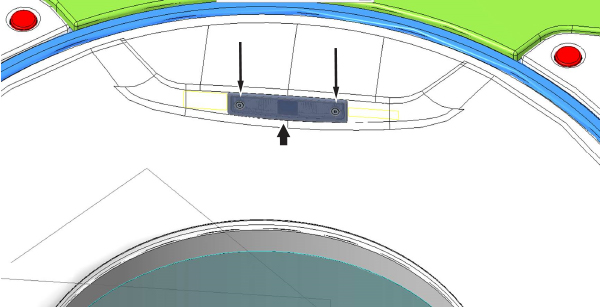
- Loosen the two captive screws, then remove the laser light cover.
Figure 3. Remove Laser Cover 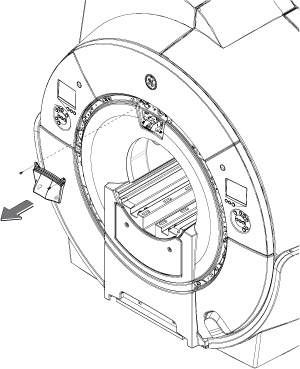
- Loosen the locking screw to enable laser alignment adjustment.
Figure 4. Laser light with cover removed 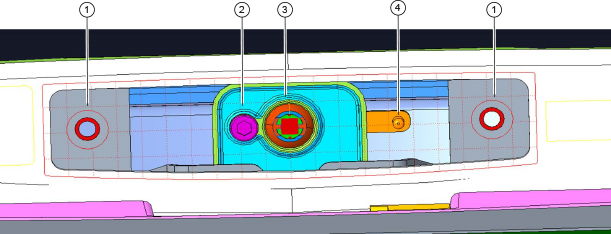
1 Threaded holes for captive screws 2 Locking screw 3 Laser light 4 Adjustment joystick - Change the position of the alignment lights by moving the adjustment joystick.
- Use the adjustment joystick to adjust the alignment so that the axial light (x-axis) is aligned to the bridge and the endcap joints on both sides of the bridge.
- Use the adjustment joystick to adjust the alignment so that the sagittal light (z-axis) is centered down the middle of the bridge.
Figure 5. Correct alignment 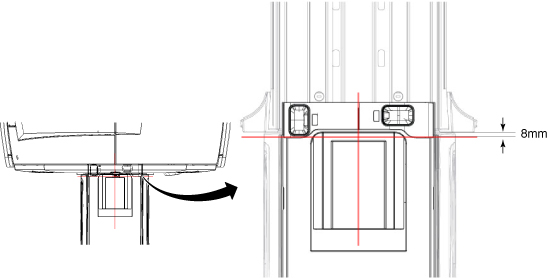
Finalization
Note: If this is the initial alignment during installation, no finalization is required. (DQA calibration will be completed in later steps of the ICW.)
- Complete DQA Calibration to calibrate the isocenter. See Doing DQA calibration.
- If no further calibrations is required for this service event, run the Save and Restore Tool to save the current system calibrations.