
- SIGNA™ Hero 3.0T Service Methods
- 5852800-8EN Revision 1.0
- 00000018WIA307DEE20GYZ
- id_131065513.0
- Jul 17, 2019 6:08:41 PM
Troubleshooting for DQA Tool Failure caused by inappropriate recon scale factor
If SIGNA Pioneer system is upgraded from PX25.0 to PX26.1 and restore info is not done properly, recon scale factor may become too high for original DPP and DQA Test may fail. See illustration below. This troubleshooting guides to fix this problem.
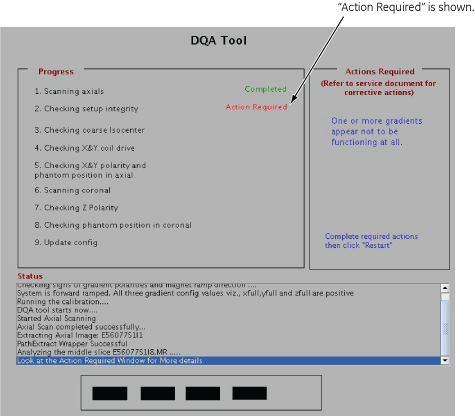
-
Open any of the obtained image by DQA cal and measure the ROI using the circler area covering whole image. Then, read the Max value. If Max value is 32767, it is necessary to update the recon scale factor.
Figure 2. ROI Measurement 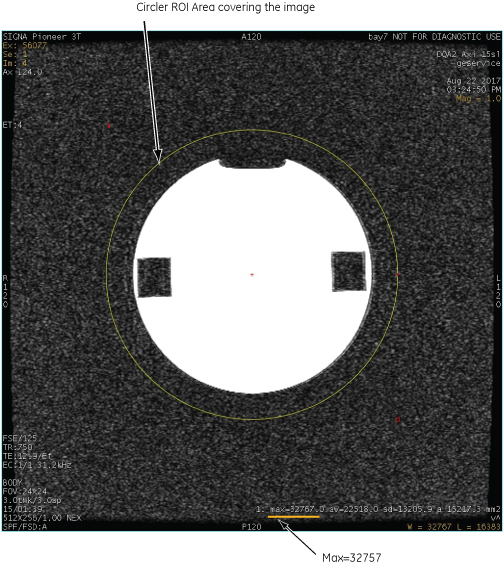
-
Enter the following command and hit [Enter] key in the terminal to open CDE tool.
runCDE [Enter]
-
In CDE tool, perform the following steps.
-
Click [Coil Information] Tab.
-
Select “GE-BODY” in Clinical Coil Names.
-
Update Recon Scale to “8”.
-
Click [Quit] button.
Figure 3. CDE tool 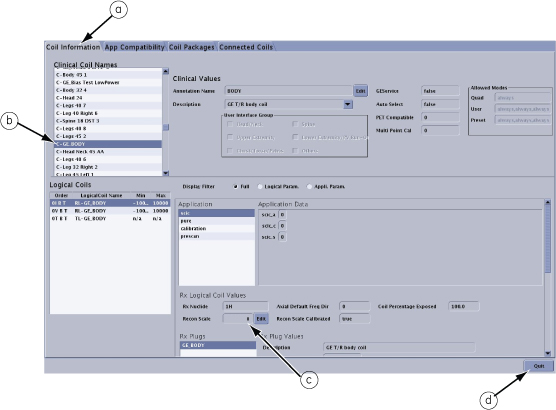
-
-
Perform DQA Tool again.