
- Discovery MR750 3.0T System Service Methods
- 5690009-2EN Revision 4
- 00000018WIA3028EE20GYZ
- id_131061633.0
- Aug 29, 2019 1:46:31 AM
Verification of SaveInfo Data
Prerequisites
| Required persons | Preliminary requirements | Procedure | Finalization |
|---|---|---|---|
| 1 | Not Applicable | 60 seconds minutes | Not Applicable |
| Condition | Reference | Effectivity |
|---|---|---|
|
Software is up and running. | - | - |
About this task
The checkINFO program is used to verify contents of the SaveInfo data on the system disk and on the actual SaveInfo DVD. The program first checks the system disk for the proper files and proper file size.
If discrepancies are discovered, the program will report what is wrong. The program will halt, and not check the SaveInfo DVD for proper file structure. If the SaveInfo structure is okay, the program will automatically check the contents of the SaveInfo DVD.
There are three methods to execute the checkINFO command:
-
checkINFO -pre - performs a check on the system disk only.
-
checkINFO -post - performs a check on the DVD only.
-
checkINFO - performs a check on both the system disk and DVD. The program will not perform a check on the DVD if issues are found on the system disk.
Procedure
- Start the verification by typing checkINFOEnter. This is case sensitive.
First, the program will ensure files on the host scanner, that are normally written to a SaveInfo DVD, are present and not corrupted. Next, it will check the saved information on DVD to match what is on the system. See Figure 1 for an example of a successful check.
Figure 1. Passed SaveInfo Check 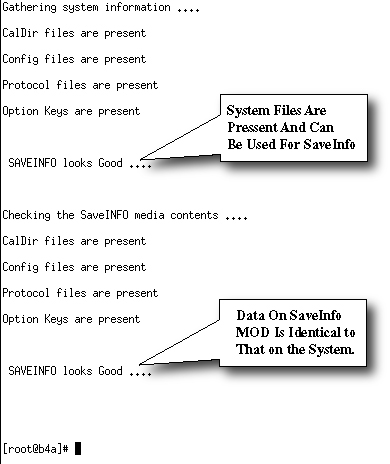
If issues are noted with the SaveInfo data on the system disk, they must be corrected in order to successfully transfer data to the SaveInfo DVD. Potential causes for failures are excessive file size (greater than 40 mB) or “special characters” such as *(&$#@ in the character string that may have been used when customers created protocols.
If issues are found, a message displays informing the operator of files that need to be moved or fixed in order for the SaveInfo to properly archive to media (DVD). The system will list what files will need to be moved or fixed. Discuss these issues with the customer and attempt to fix the offending files or move them to a temporary directory before starting SaveInfo.
As an example, if the file /usr/g/protocol/site/head/noggin scan is reported corrupted and it is not possible to fix, you will need to move it.
-
Create a temporary directory: mkdir /usr/g/tempEnter.
-
Move the file: mv /usr/g/protocol/site/head/noggin scan /usr/g/tempEnter.
-
Perform a SaveInfo.
-
Finalization
No finalization steps.