Prerequisites
Table 1. Personnel requirements| Required persons | Preliminary requirements | Procedure | Finalization |
|---|
| 1 | Not Applicable | 1 hours | Not Applicable |
Table 2. Tools and test equipment| Item | Quantity | Effectivity | Part number | Manufacturer |
|---|
| Nonmagnetic Titanium Service Tool Kit, Large Set | 1 | - | 5112581 | - |
Table 3. Safety
| Warning |
|---|
 | Strong magnetic field Ferrous materials can become dangerous projectiles in the presence of the magnetic field that the magnet produces. Do not bring any ferrous tools or equipment into the magnet room. |
|
About this task
Removing the rear cosmetic cover is needed when replacing the
gradient coil, rear bell, split bridge, and busbar.
Procedure
- Remove the rear pedestal cover.
- Remove the two hose cover screws and remove the hose cover.
Figure 1. Removing hose cover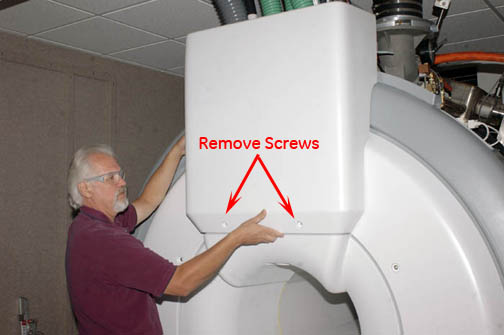
Note: To remove the left side rear cosmetic cover, disconnect the RF Hub blower air hoses from the top and bottom of the cover.
Remove the four rear cosmetic cover screws.
Figure 2. Rear cosmetic covers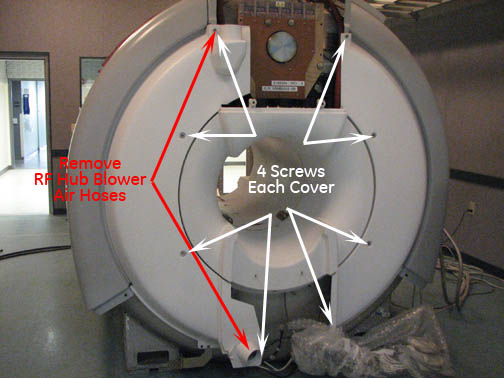
- Pull the cosmetic cover away from the magnet to release the
cover from the poppers.
Figure 3. Removing cosmetic cover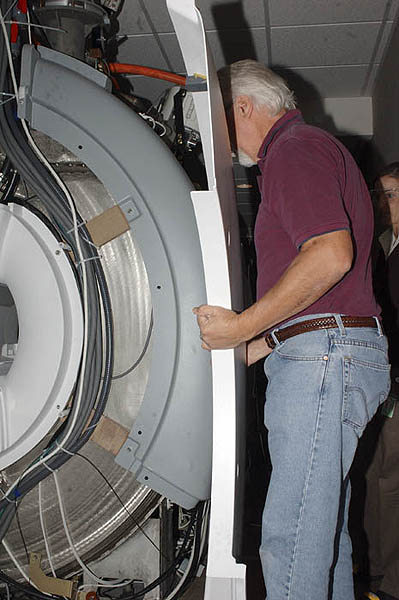
- To install the cosmetic cover, reverse the removal procedures.
Finalization
No finalization steps.
