Table Control Box
Prerequisites
note:
If Table Control Box 5458804 installed in site need to be replaced, please order 5458804/5458804-2 for replacement.
If Table Control Box 5458804-2 installed in site need to be replaced, please order 5458804-2 for replacement.
Procedure
- Turn the system power OFF. refer to Lockout / Tagout for System Cabinet PDU Main Breaker.
- Remove FRP bottom covers of Fixed Table.
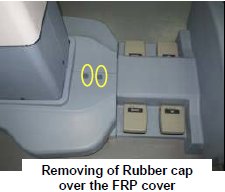
- Remove the Rubber cap and then screws of the FRP bottom cover
on the near the Gantry end of the Table.
Figure 2. FRP Cover1
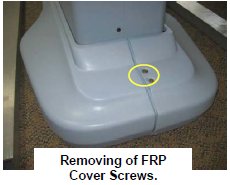
- Similarly remove the cap and screws of the FRP bottom cover
on the rear end of the Table.
Figure 3. FRP Cover2
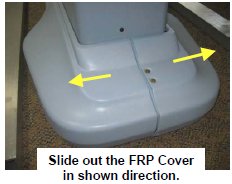
- Remove the right Bottom FRP Cover. Similarly remove the left
Bottom FRP cover on the other side
Figure 4. FRP Cover3
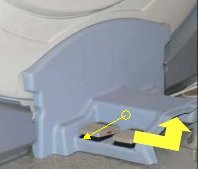
- Now remove the Dock FRP Cover Locking screws and then the Dock
FRP cover carefully.
Figure 5. FRP Cover4
- Keep both Bottom FRP Covers and Dock FRP covers aside safely.
- Remove the Rubber cap and then screws of the FRP bottom cover
on the near the Gantry end of the Table.
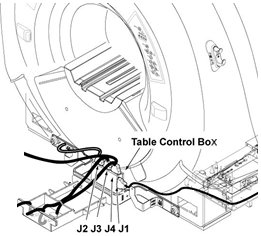
- Disconnect cables from Table Control Box.
Figure 6. Cables of Table Control Box
- Remove defective Table Control Box by removing one screw.
Figure 7. Convert Board 3 Removal
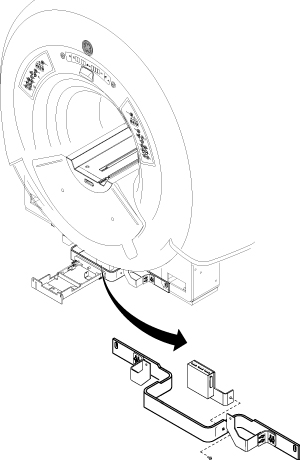
- Install new Table Control Box by reverse order of removal.
- restore the system power. Refer to Lockout / Tagout for System Cabinet PDU Main Breaker.
Finalization
No finalization steps.