Stopping and Starting TNS Function
Prerequisites
See Stopping the TNS Function Via Software for procedure to stop the TNS Function and then Enabling the TNS Function Via Software for turning the TNS Function back on.
1 Stopping the TNS Function Via Software
Procedure
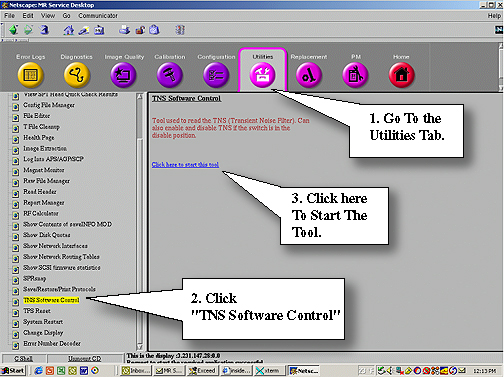
- On the Common Service Desktop go to the Utilities Tab and start TNS Software Control. See Figure 1.
Figure 1. Starting TNS Tools
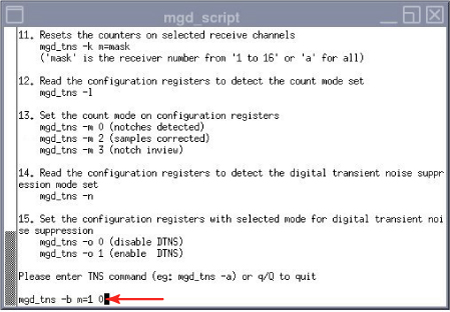
- Once the mgd_script page opens, at the command line type: mgd_tns -b m=1 0Enter to turn off
the TNS Function. See Figure 2.
Figure 2. Command Line to Stop TNS
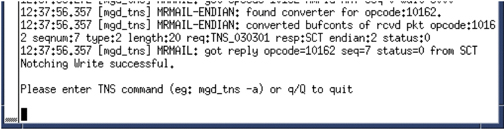
- You’ll see the Notching Write successful if the shut down was successful. See Figure 3
Figure 3. Notching Write Successful Statement
- Leave the window open. Closing the window will enable the TNS Function again.
2 Enabling the TNS Function Via Software
Procedure
- On the Common Service Desktop go to the Utilities Tab and start TNS Software Control. See Figure 1.
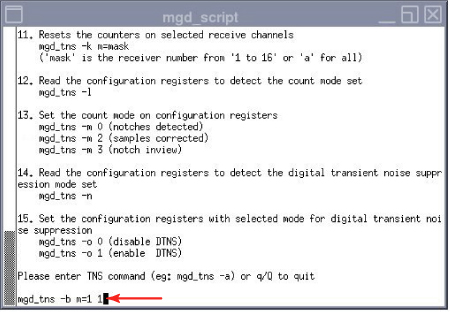
- Once the mgd_script page opens, at the command line type: mgd_tns -b m=1 1Enter to turn on
the TNS. See Figure 4.
Figure 4. Starting The TNS
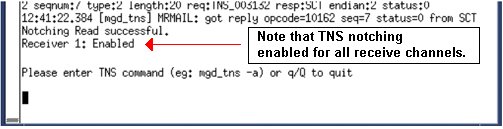
- At the command line type: mgd_tns -aEnter. If successful you will see notching will be enabled
for all channels. See Figure 5.
Figure 5. Successful
- Select q to exit from the window.
3 Finalization
Finalization
No finalization steps.